Recall - Secondary Air Injection OBD Improvements
Bulletin No.: PE07-03-S001Issue Date: July 2007
Product Enhancement For Inventory And Customer Vehicles-OBD System Improvements (PE07-L003)
Affected Vehicles:
2006 Isuzu Ascender with 4.2L Engine
THIS PRODUCT ENHANCEMENT INCLUDES VEHICLES IN DEALER INVENTORY AND CUSTOMER VEHICLES THAT RETURN TO THE DEALERSHIP FOR ANY REASON AND WILL EXPIRE AT THE END OF THE INVOLVED VEHICLE'S 8 YEAR /80,000 MILE (130,000 KM) SPECIFIED MAJOR EMISSION-CONTROL COMPONENTS DEFECT WARRANTY COVERAGE ENHANCEMENT PERIOD.
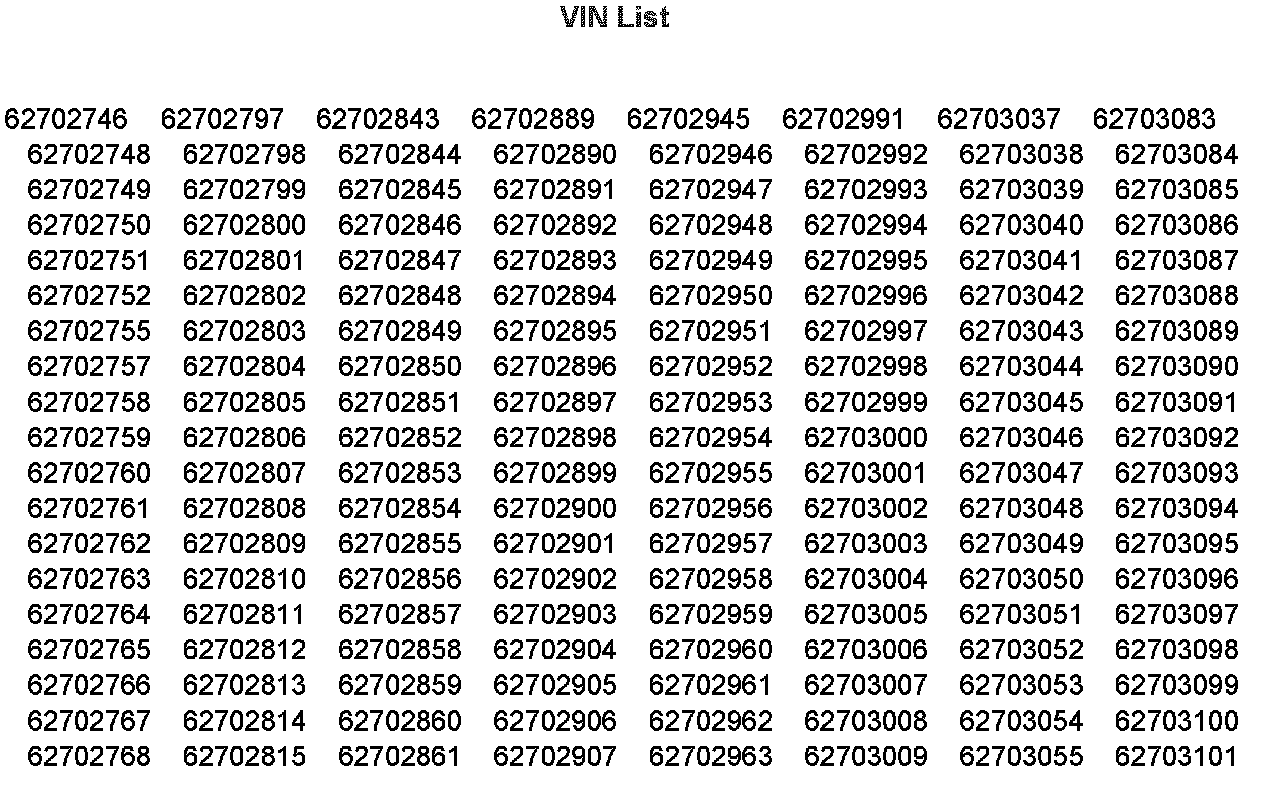
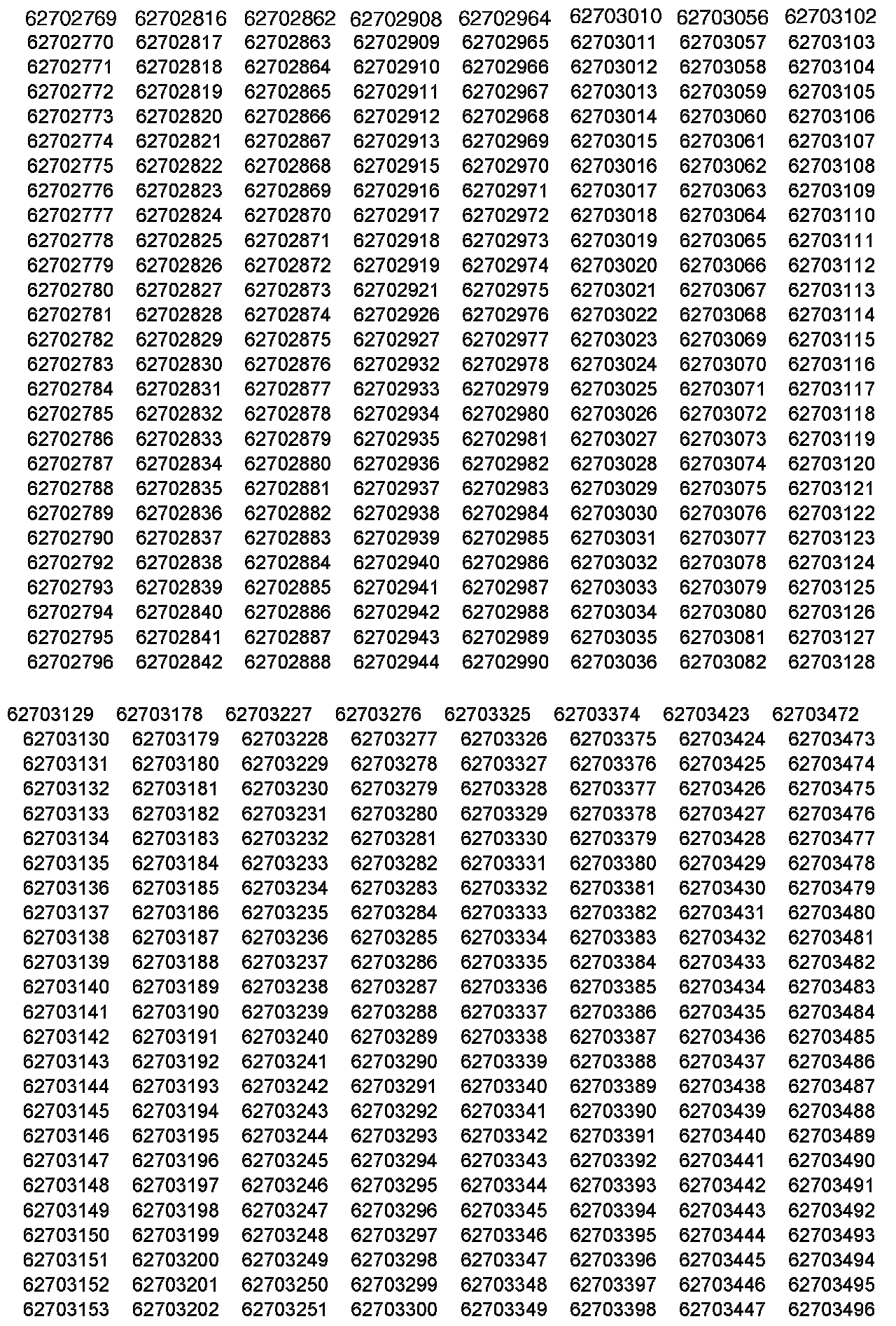
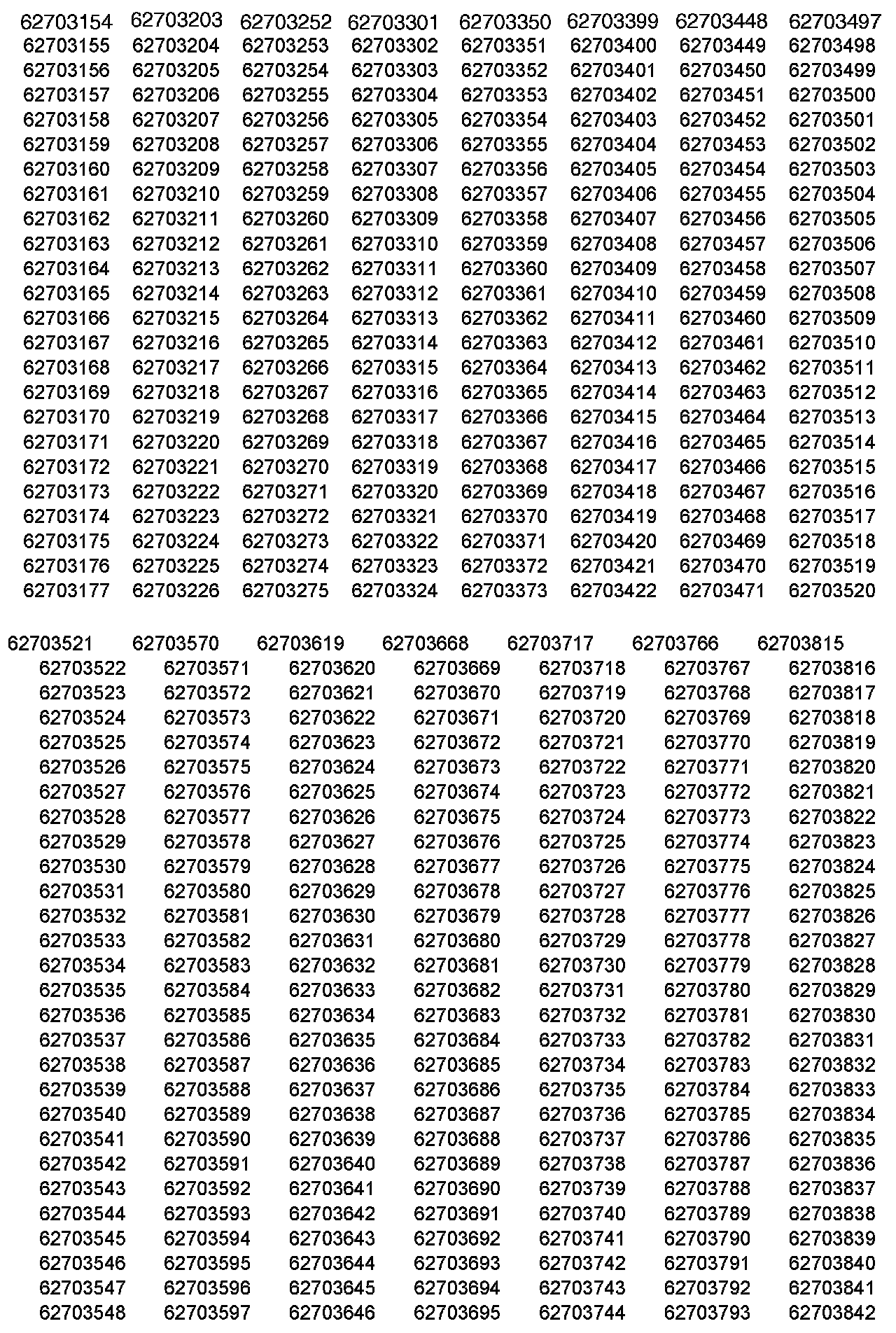
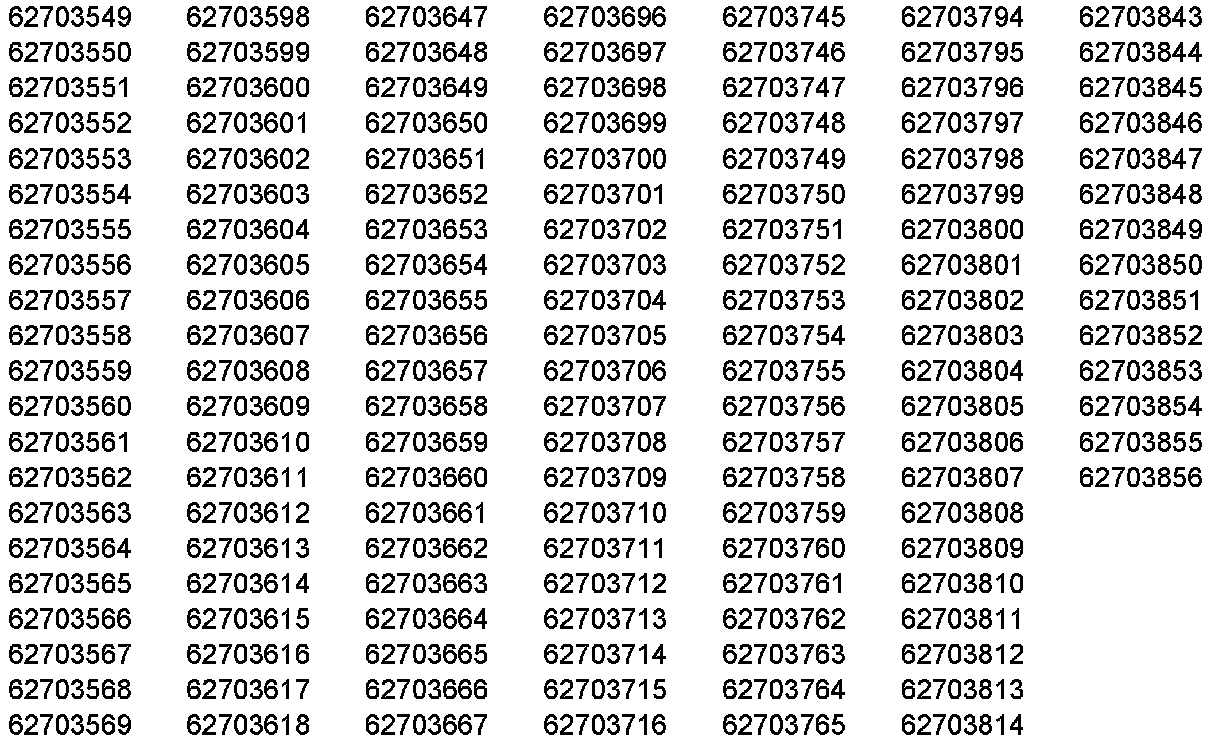
IMPORTANT:
Dealers are to confirm vehicle eligibility prior to beginning repairs. Involved are certain 2006 model year Isuzu Asecnder vehicles. Refer to the VIN listing shown and validate vehicle's VIN through Isuzu Communication System (ICS) Vehicle Inquiry or IsuzuONE.com Vehicle Inquiry.
Service Information
Purpose:
This bulletin provides a service procedure to reprogram the Engine Control Module (ECM) calibration on certain 2006 Isuzu Ascenders equipped with 4.2L I-6 (RPO LL8 - VIN S) engines. The revised calibration includes Secondary Air Injection Reaction (SAIR) OBD system improvements that should be installed as soon as practical.
NOTE:
This service procedure should be completed as soon as possible on involved vehicles currently in dealer inventory and customer vehicles that return to the dealership for any reason during the New Vehicle 8 year/80,000 mile (130,000 km) Specified Major Emissions-Control Components Defect Warranty Coverage Enhancement Period.
Service Procedure
The PCM should be reprogrammed using calibrations that were released on IDS Version 15 or newer.
The updated PCM calibrations were released on IDS Version 15 and newer. As always make sure your Tech2 is updated with the latest software version. Refer to the Engine and Powertrain Control Module Programming and Setup procedures in the Service Manual for further information.
NOTE:
Before reprogramming, please check the battery condition to prevent a programming error of any of the modules due to battery discharge. Battery voltage must be between 12 and 16 volts during reprogramming. If the vehicle battery is not fully charged, use jumper cables from an additional battery. Be sure to turn off or disable any system that may put a load on the battery, such as automatic headlamps, daytime running lights, interior lights, heating, ventilation, and air conditioning (HVAC) system, radio, engine cooling fan, etc. A programming failure or control module damage may occur if battery voltage guidelines are not observed.
The ignition switch must be in the proper position. The Tech2 prompts you to turn ON the ignition with the engine OFF. DO NOT change the position of the ignition switch during the programming procedure unless instructed to do so.
Make certain all tool connections are secure including the following components and circuits:
^ The RS-232 communication cable port
^ The connection at the data link connector (DLC)
^ The voltage supply circuits
DO NOT disturb the tool harnesses while programming. If an interruption occurs during the programming procedure programming failure or control module damage may occur.
DO NOT turn OFF the ignition if the programming procedure is interrupted or unsuccessful. Ensure that all control module and DLC connections are secure and the TIS terminal operating software is up to date.
Tech2 Remote Programming Method
1. Verify the battery charge of 12 to 16 volts. The battery must be able to maintain the charge during programming. Use an additional jump battery if necessary.
2. Use the normal "request method" through "Service Programming System" to request information from the vehicle.
3. At Isuzu TIS 2000 main menu select Service Programming System.
4. Select Tech2 from the "Select Diagnostic Tool" window.
5. Select Reprogram ECU from the "Select Programming Process" window.
6. Select Vehicle from the "Select ECU Location" window.
7. Select Next to go to the "Preparing for Communication" instruction screen.
8. Select Next to view the "Validate Vehicle ID Number" screen. If the vehicle ID number does not appear on the screen manually insert the VIN into the VIN window of the "Validate Vehicle ID Number" screen.
9. Select Next to view the "Supported Controllers" screen.
10. Select PCM Powertrain Control Module from Supported Controllers window.
11. Select Next to view the "Select Programming Type" window.
12. Select Normal from the "Select Programming Type" window.
13. Select Next to view the "Service Programming System Calibration Selection" screen.
14. Select Next to view "Summary" screen.
15. Verify and record all 8-digit calibration numbers shown under Current # and Selected # as displayed on the "Summary" screen.
16. Select Next to download the calibration to the Tech2.
17. Back at the vehicle enter "Service Programming Systems".
18. Select Program ECU and follow the on-screen instructions.
19. When programming is complete do the following:
a. Turn the Tech2 OFF.
b. Turn the ignition switch OFF
20. Wait 30 seconds.
21. Turn the ignition switch to ON with the engine OFF.
22. Go into Diagnostics and check for DTC codes.
23. Clear all codes.
Warranty Claim Information
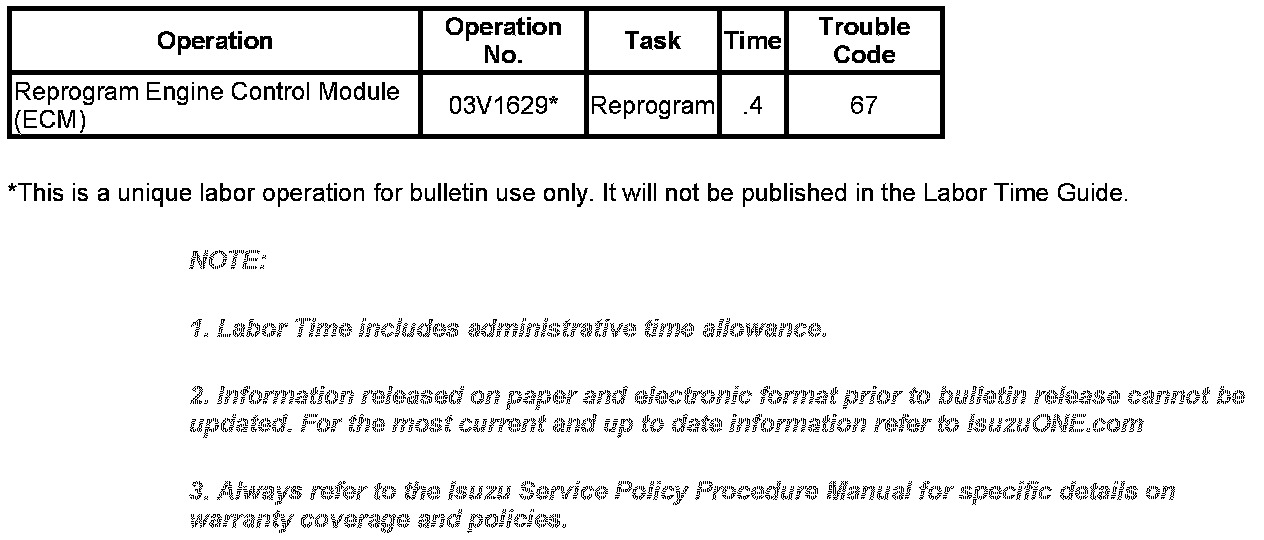
Use the labor operation table shown.

Disclaimer