A/T - Torque Converter Lock-Up Inoperative
NUMBER: 18-028-04GROUP: Vehicle Performance
DATE: June 30, 2004
THE DRBIII(R) FLASH FILES FOR THIS BULLETIN ARE AVAILABLE ON DealerCONNECT.
FOR MARKETS OUTSIDE OF THE UNITED STATES AND CANADA, THE FLASH FILES AND REPROGRAMMING INSTRUCTIONS WILL BE AVAILABLE ON ITIL/ISIS DVD AUGUST, 2004.
SUBJECT:
Flash: 4.0L Torque Converter Lock-Up Feature
OVERVIEW:
This bulletin involves selectively erasing and reprogramming the Powertrain Control Module (PCM) with new software.
MODELS:
2004 (WJ) Grand Cherokee (Domestic Market Only)
NOTE:
This bulletin applies to vehicles equipped with a 4.0L engine (sales code ERH) and with PCM software version 56044563A1. This may include vehicles built on or after March 01, 2004 (MDH 0301XX), or where Service Bulletin 18-008-04 has been performed prior to date of this Service Bulletin (June 30, 2004).
SYMPTOM/CONDITION:
The following enhancements are included with this software:
^ The feature within the PCM software for torque converter lock-up feature is enabled.
The torque converter lock-up feature is allowed to occur once the 42RE transmission has engaged 4th gear at speeds greater than approximately 77 km/h (48 mph), or if overdrive is turned off when 3rd gear is engaged at speeds greater than approximately 47 km/h (29 mph). The difference in engine speed when the torque converter lock-up feature is enabled or disabled may be approximately 100 - 300 RPM. An enabled torque converter feature may improve vehicle fuel economy dependent upon how the vehicle is operated.
DIAGNOSIS:
Using a Scan Tool (DRBII I�) with the appropriate Diagnostic Procedures Manual, verify all engine systems are functioning as designed. If DTCs are present record them on the repair order and repair as necessary before proceeding further with this bulletin.
Using the DRBIII(R), determine if the PCM software version is at 56044563AI.
If the PCM software version is at 56044563AI and the vehicle operator describes or experiences the Symptom/Condition, perform the Repair Procedure.

PARTS REQUIRED:
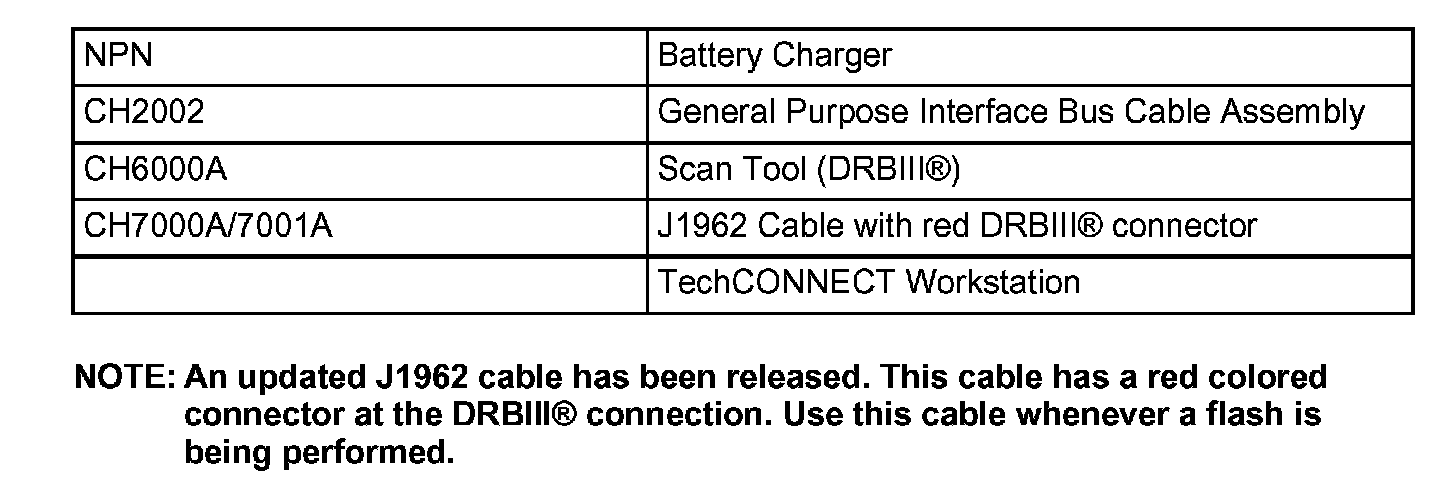
SPECIAL TOOLS/EQUIPMENT REQUIRED:
REPAIR PROCEDURE:
NOTE:
Whenever a controller is programmed, the software in the DRBIII(R); must be programmed with the latest revision level available.
NOTE:
If this flash process is interrupted/aborted, the flash should be restarted and then follow the directions on the DRBIII(R).
1. Before beginning the reprogramming procedure, remove any old flash reprogramming files from the DRBIII(R) memory. To clear the memory from the MAIN MENU:
a. Simultaneously press the "MORE" and "YES" keys.
b. A screen will appear requesting a "COLD BOOT".
c. Follow the on screen instructions by selecting the "F4" key.
d. When the DRBIII(R) reboots to the MAIN MENU, proceed to Step # 2
2. With the ignition switch in the "RUN" position, determine the original part number of the PCM currently in the vehicle. Using the DRBIII(R) select:
a. "DRBIII(R) Standalone"
b. "1998 - 2005 Diagnostics"
c. "All (Except Below)"
d. "Engine"
e. "Module Display"
f. Record the "PCM part # " on the repair order for later reference.
3. Connect the DRBIII(R) to TechCONNECT. Open TechTOOLS and verify that the "DRBIII(R) Status: Connected" message is in the upper right corner of the TechTOOLS screen.
4. Enter the "PCM part # " recorded in Step # 2 in the "Parts Criteria" area and select "Show Updates". TechTOOLS will populate the appropriate calibration.
5. Select the calibration.
6. Select the "DRBIII" radio button which is next to the "Download/Update" button.
7. Select the "Download/Update" button.
8. Monitor the "Flash Download/Update Progress" window on the TechCONNECT and follow the instructions on TechCONNECT. When the flash process is complete, proceed to Step # 9.
9. Disconnect the DRBIII(R) from TechCONNECT.
10. Open the hood, install a battery charger and verify that the charging rate provides approximately 13.5 volts.
11. Connect the DRBIII(R) to the vehicle.
12. Download the flash from the DRBIII(R) to the vehicle. Using the DRBIII(R) select:
a. "Vehicle Flash"
b. Follow the directions on the DRBIII(R) screen. When the flash process is complete, proceed to Step # 13.
NOTE:
Due to the PCM programming procedure, a DTC may be set in other modules (TCM, BCM, MIC, SKIM, etc.) within the vehicle, if so equipped. Some DTC's may cause the MIL to illuminate. Check all modules using "Module Scan", record the DTC's, and erase these DTC's prior to returning the vehicle to the customer. Erase any DTC's in the PCM only after all other modules have had their DTC's erased.
NOTE:
The following step is required by law.
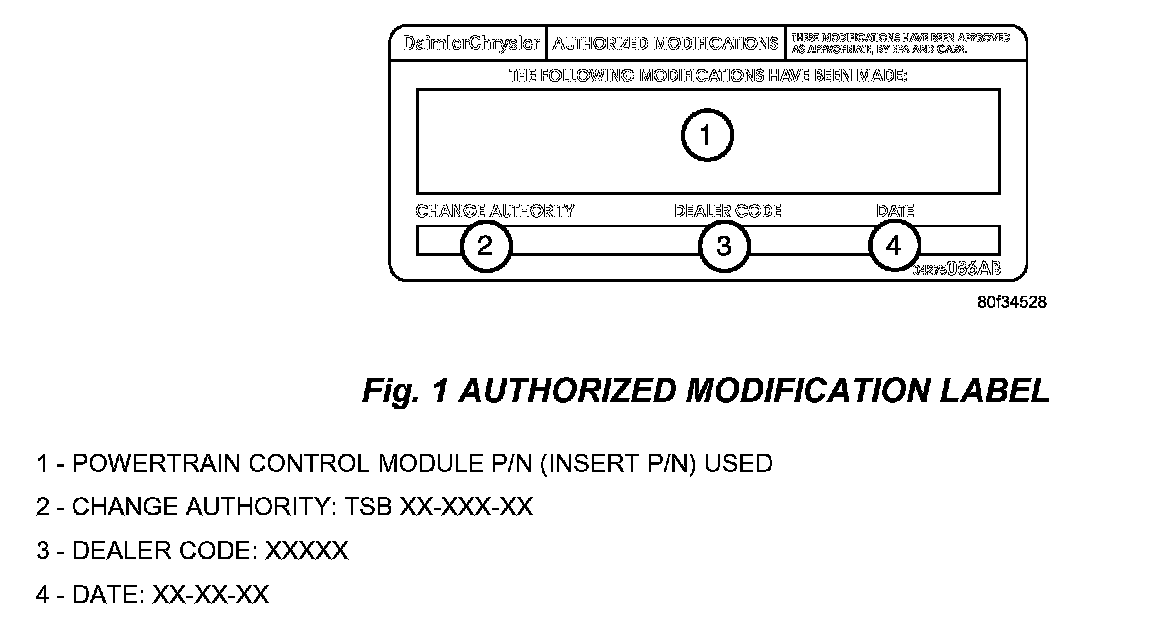
13. Type the necessary information on the "Authorized Modification Label" p/n 04275086AB and attach near the VECI label (Fig. 1).
POLICY:
Reimbursable within the provisions of the warranty.

TIME ALLOWANCE:

FAILURE CODE:
Disclaimer:
This bulletin is supplied as technical information only and is not an authorization for repair.