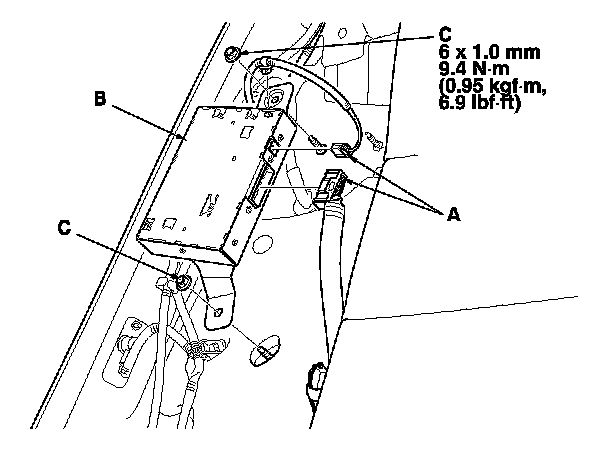
AcuraLink Control Unit (XM Receiver) Removal/Installation
AcuraLink Control Unit (XM Receiver) Removal/Installation
NOTE: The AcuraLink must be reactivated by Acura Client Services when:
- The AcuraLink control unit (XM receiver) is replaced.
- DATA RESET was selected while in the self-diagnostic function.
- Vehicle ownership changes.
1. Remove the right rear seat side bolster. Rear Seat Removal/Installation
2. Disconnect connectors (A) from the AcuraLink control unit (XM receiver) (B).
3. Remove the mounting nuts (C) and the AcuraLink control unit (XM receiver).
4. Install the AcuraLink control unit (XM receiver) in the reverse order of removal.
NOTE: If you replaced the AcuraLink control unit (XM receiver), make sure it has the latest software. Programming and Relearning
5. Call XM Satellite Radio to update the client's account with the new XM/HIP serial number. Also call Acura Client Services to reactivate the AcuraLink.