AcuraLink Control Unit (XM Receiver) Removal/Installation
AcuraLink Control Unit (XM Receiver) Removal/Installation
NOTE: The AcuraLink must be reactivated by Acura Client Services when:
- The AcuraLink (XM) unit is replaced.
- DATA RESET was selected while in the self-diagnostic function.
- Vehicle ownership changes.
1. Remove the left side trunk trim Interior Trim Removal / Installation - Trunk Area.
2. Disconnect the 2P connector (A) and 32P connector (B) from the AcuraLink control unit (XM receiver) (C).
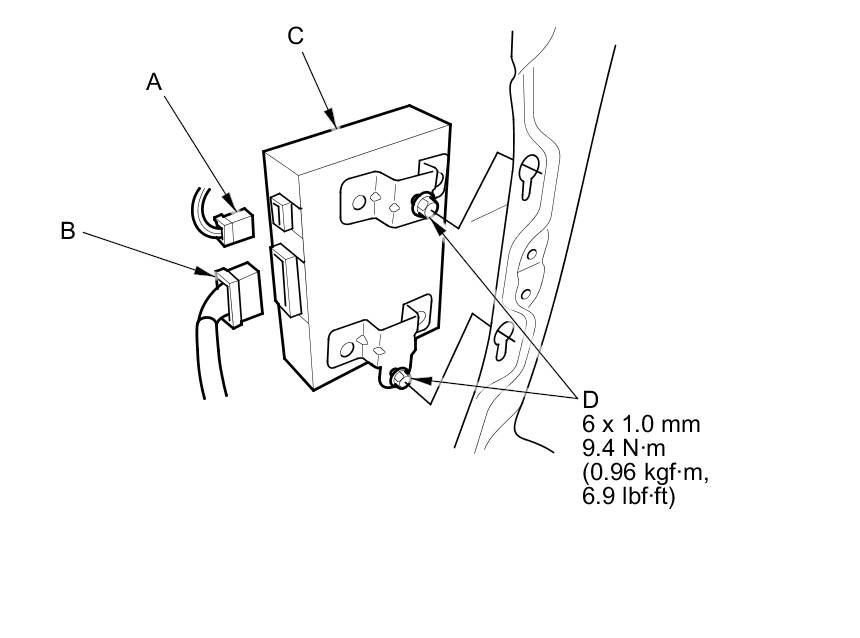
3. Loosen the mounting bolts (D), then pull out the AcuraLink control unit (XM receiver).
4. Install the AcuraLink control unit (XM receiver) in the reverse order of removal.
NOTE: If you replaced the AcuraLink control unit, make sure it has the latest software Programming and Relearning.
5. Call XM Satellite Radio to update the client's account with the new XM/HIP serial number. Also call Acura Client Services to reactivate the AcuraLink.