Data Bus On Board Diagnostic Interface (J533)
Data Bus On Board Diagnostic Interface (J533)
Special tools, testers and auxiliary items required
• Protective cap for cable connector (VAS 6223/9) from fiber optic plier repair set (VAS 6223)
Removing
- If the control module was replaced, select the "Replace" function for the respective control module in "Guided Fault Finding" or "Guided Functions" using the Vehicle Diagnostic Tester.
- Select the function or path:

- Follow the instructions on the Vehicle Diagnostic Tester display.
- Switch off ignition and remove ignition key.
- Remove glove compartment.
- Remove bolt - 2 -.
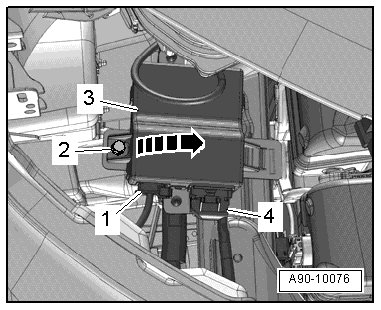
- Pivot the data bus on board diagnostic interface - 3 - out of the bracket - arrow -.
- Disconnect the electrical connector - 4 -.
- Disconnect the fiber optic cable connector - 1 -.
- Seal open wiring harness fiber optic connector - 2 - with (VAS 6223/9) - 1 -.

• Protective cap prevents contamination of or mechanical damage to end face of fiber optic cable which would impair signal transmission.
Installing
• Tightening specification, refer to => [ Instrument Cluster Clock Receiver Overview ] Instrument Cluster Clock Receiver Overview.
Install in reverse order of removal, observing the following:
- Install glove compartment.
- Follow the instructions on the Vehicle Diagnostic Tester display with a new data bus on board diagnostic interface.