Symptom Troubleshooting
Symptom Troubleshooting: Interface dial buttons do not work
Interface dial buttons do not work
NOTE:
- Always make sure that the correct DVD color and version are installed.
- Inspect the DVD for dirt or damage.
- Check the vehicle battery condition first.
- Confirm the correct DVD color and version disc is installed in the navigation unit Service and Repair as the wrong DVD or software version can cause a hardware malfunction.
- Check the connectors for poor connections or loose terminals.
- Before troubleshooting, make sure you have the anti-theft code for the audio system and the navigation system.
- After troubleshooting, enter the anti-theft codes for the audio system and the navigation system (if equipped).
1. Start the vehicle.
2. Go into the Diagnostic mode, and use Hard Key test under Unit Check. Navigation System Diagnostic Mode (With Navigation)
Does the interface dial and/or joystick work properly?
YES - The system is OK at this time.
NO - Go to step 3.
3. Measure the voltage between the interface dial 5P connector terminal No. 4 and body ground.
Is there battery voltage?
YES - Go to step 4.
NO - Repair open in the wire between the under-dash fuse/relay box and the interface dial.
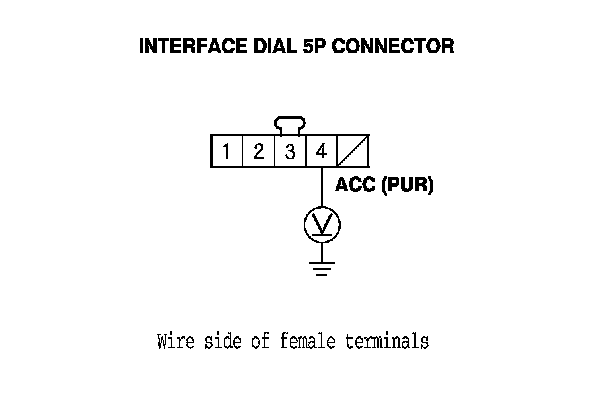
4. Measure the voltage between interface dial 5P connector terminal No. 3 and body ground.
Is there less than 0.5 V?
YES - Go to step 7.
NO - Repair open in the wire between the interface dial and body ground (G506).
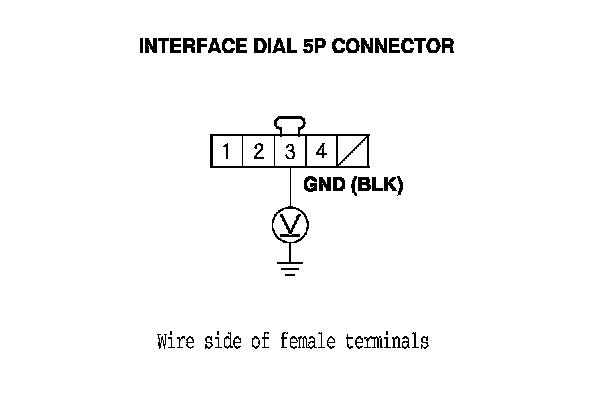
5. Turn the ignition switch to LOCK (0).
6. Disconnect the interface dial 5P connector and the navigation unit connector A (20P).
7. Check for continuity between navigation unit connector A (20P) terminal No. 17 and interface dial 5P connector terminal No. 1.
Is there continuity?
YES - Go to step 8.
NO - There is an open in the circuit between the interface dial and the navigation unit. Replace the affected shielded harness.
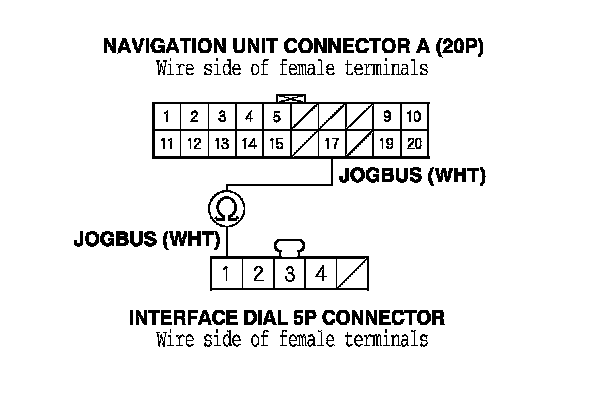
8. Check for continuity between navigation unit connector A (20P) terminals No. 17 and No. 19.
Is there continuity?
YES - There is a short in the wire. Replace the affected shielded harness.
NO - Go to step 9.
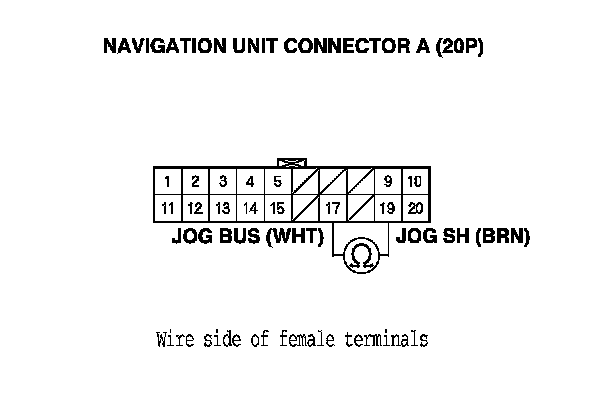
9. Substitute a known-good interface dial, Service and Repair and recheck.
Is the system OK?
YES - Replace the original interface dial. Service and Repair
NO - Replace the navigation unit. Service and Repair