Navigation System II-D On Screen Error Messages
Navigation System II-D On Screen Error Messages
If there is a malfunction in the system, either a fault is saved in the DTC and/or an error message is given on the Operating Electronics, Navigation Control Module (J402) display.
Indicator in display:

This error message appears:
• No or faulty CAN communication between Operating Electronics, Navigation Control Module (J402) and Navigation Interface (R94) (wiring interruption or wiring not connected).
• Navigation Interface (R94) is faulty.
If this malfunction occurs, no RDS TMC traffic messages can be received and setting menu "Traffic jam function" cannot be called up.
Indicator in display:

This error message appears:
• No or faulty CAN communication between Operating Electronics, Navigation Control Module (J402) and Telephone/Telematics Control Module (J256) (wiring interruption or wiring not connected).
• Telephone/Telematics Control Module (J256) is faulty.
• Terminal 15 is off (ignition switched off).
If this malfunction occurs, telephone cannot receive TMC traffic messages. Dynamic route guidance is not possible and the "Traffic Jam Function " setting menu cannot be called up.
Indicator in display:

This error message appears:
• No or faulty CAN communication between Operating Electronics, Navigation Control Module (J402)
Indicator in display:

This message appears:
• This message in the navigation display is not a malfunction.
Make customer aware of this.
Indicator in display:
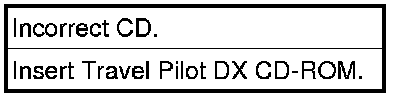
This message appears:
• When no DX version navigation CD was inserted.
- Inset navigation CD with DX logo.
Make customer aware of this.
Messages are shown until malfunction is corrected or confirmed by pressing RETURN button.