Multimedia Control Head (E380)
Multimedia Control Head (E380)
The multimedia system control head is located in the center console at the front.
- Turn off the ignition and all electrical consumers and remove the ignition key.
Removal
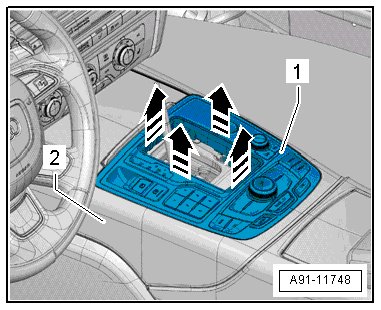
Four spring tabs hold the multimedia system control head in the center console.
The surfaces can get scratched very easily. Tape off all surfaces and components!
- Remove the handle for the selector lever.
- Reach into the opening with both hands, grab the multimedia system control head - 1 - and pull it out (upward) - arrow - of the center console - 2 - with a single jerk.
Pay attention to the different lengths of the connectors.
- Unlock and disconnect the connectors from the back of the multimedia system control head.
- Remove the installed button ( access/start authorization button (E408) / electromechanical parking brake button (E538) ).
Installation
- Install in reverse order of removal.
Component location overview for the tightening specification and installation instructions, refer to => [ MMI Radio Plus (RMC) Component Location Overview ] MMI Radio Plus (RMC) Component Location Overview.