Front Information Display Control Head (J685) Display
Front Information Display Control Head (J685) Display
The front information display control head (Display) is located in the center of the instrument panel.
- Turn off the ignition and all electrical consumers and remove the ignition key.
Removing
The front information display control head can only be removed when the lid is opened.
- Remove the display unit cover from the instrument panel..
The bolts on the display mount will also be removed when the trim on the front passenger side is removed.
Pay attention to the wire routing to the display inside the instrument panel. It will not be possible to extend the display again if the wiring is routed incorrectly during installation.
- Extend the front information display control head.
- Carefully pull the display mount - 1 - out of the instrument panel - arrow - until is possible to disconnect the connectors from the front information display control head.
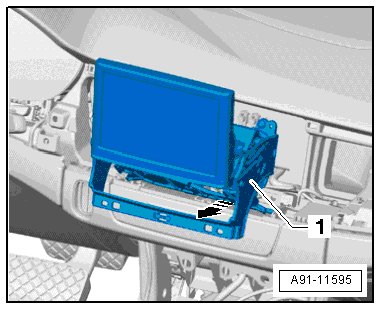
- Unlock and disconnect the connector from the display mount.
- Pull the display mount out of the instrument panel completely.
Removing front information display control head
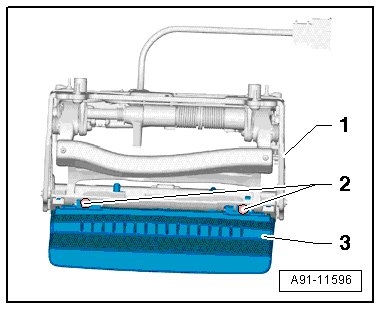
Two bolts attach the front information display control head to the display mount.
- Remove the bolts - 2 - and remove the front information display control head - 3 - from the display mount - 1 -.
Installing
Pay attention to the wire routing to the display inside the instrument panel. It will not be possible to extend the display again if the wiring is routed incorrectly during installation.
- Install in reverse order of removal.
- Be sure to guides the wires from the front information display control head to the wiring harness and information electronics control module 1 (J794) exactly, otherwise the front information display control head will not extend.
Component location overview for the tightening specification and installation instructions refer to => [ Component Location Overview ] Component Location Overview.