Locking Control Modes
Locking Control Modes:
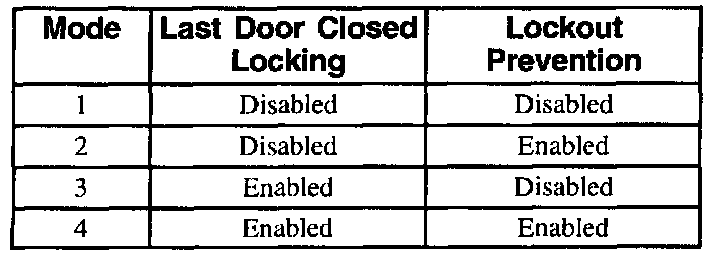
- Last door closed locking enabled (modes 3 and 4): When pressing LOCK on either door lock switch with the ignition switch in the LOCK position, this mode locks all doors five seconds after closing all vehicle doors.
- Lockout prevention enabled (modes 2 and 4): When pressing LOCK on either door lock switch with the key in the ignition cylinder and the driver's door is open, the BCM does not lock the doors.
Changing the Locking Control Mode
Perform the following procedure to change the locking control mode:
1. Turn off be I/P dimmer switch.
2. Turn the ignition switch to the LOCK position.
3. Remove the BCM PRGRM fuse.
4. Turn the ignition switch to the ACC position.
- The BCM sounds the chime a number of times equivalent to the BCM type installed on the vehicle (1, 2, 3, or 4 chimes).
- Now the BCM has entered the feature customization mode.
5. To change the locking control mode, press and release the UNLOCK on either door lock switch.
- The BCM sounds the chime a number of times equivalent to the locking control mode. A transition past mode 4 repeats the sequence starting with mode 1.
To exit and save the current customization mode:
1. Turn the ignition switch to the LOCK position.
2. Reinstall the BCM PRGRM fuse.
If unable to change locking modes. refer to Table 14 for diagnosis and repair. Table 14: Cannot Change Feature Customization Modes