Navigation Display Buttons Do Not Work or Respond Properly
Special Tools RequiredSCS service connector 07PAZ-0010100
Navigation display buttons do not work or respond properly
NOTE:
- Always check the connectors for poor connections or loose terminals.
- Before troubleshooting, get the navigation system anti-theft codes.
- After troubleshooting, enter the navigation system anti-theft codes.
1. Do Forced Starting of Display.
2. Check the status of the Display and Radio on the Navi System Link screen.
Are they all green?
YES - Go into the Diagnostic mode and use the "Touch Panel" test under Monitor Check.
NO - Go to step 3.
3. Check the status of the Navi System Link screen.
Is the Display the only system in red?
YES - Go to step 7.
NO - Go to step 4.
4. Turn the ignition switch OFF.
5. Disconnect the navigation unit connector A (20P), the navigation display connector A (20P), the audio unit connector A (20P) and B (14P), and the XM receiver connector A (14P).
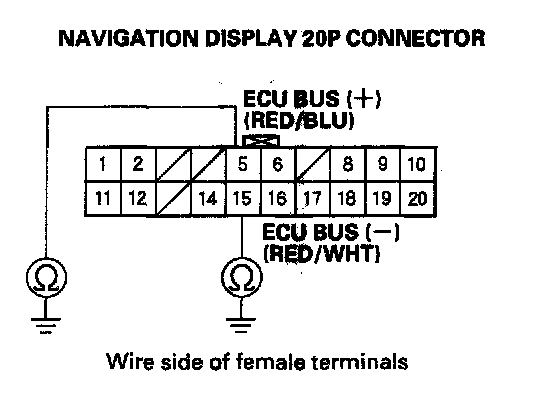
6. Check for continuity between body ground and the navigation display 20P connector terminal No. 5 and No. 15 individually.
Is there continuity?
YES - There is a short to body ground in the RED/BLU GA-Net Bus+ wire between the navigation display, the navigation unit, the audio unit and the XM receiver, or there is a short to body ground in the RED/BLU GA-Net Bus+ wire between the audio unit terminal B1 and XM receiver. Replace the affected shielded harness.
NO - Go to step 7.
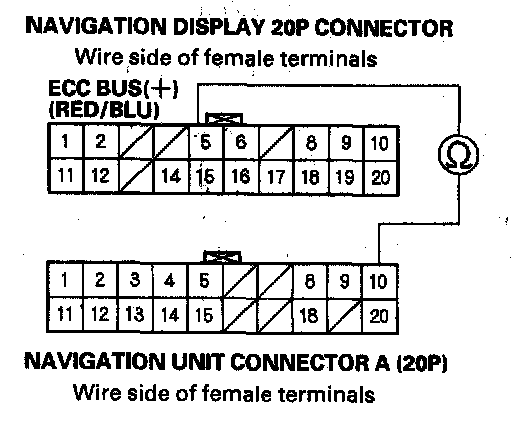
7. Check for continuity between the navigation display 20P connector terminal No. 5 and navigation unit connector A (20P) terminal No. 10.
Is there continuity?
YES - Go to step 8.
NO - There is an open in the circuit between the navigation display and the navigation unit. Check for poor connections or loose terminals at the display and navigation units. If no poor connection or loose terminal is found, replace the affected shielded harness.
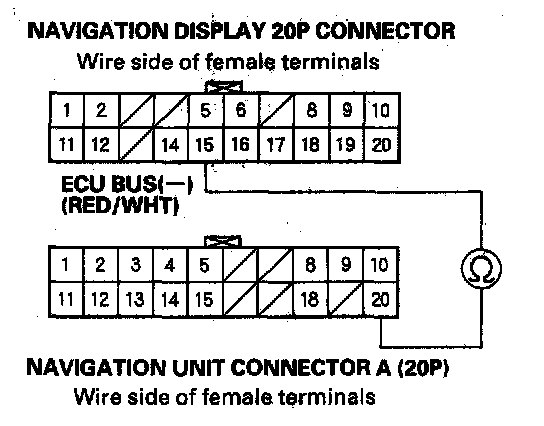
8. Check for continuity between the navigation display 20P connector terminal No. 15 and navigation unit connector A (20P) terminal No. 20.
Is there continuity?
YES - Replace the navigation display.
NO - There is an open in the circuit between the navigation display and the navigation unit. Check for poor connections or loose terminals at the display and navigation units. If no poor connection or loose terminal is found, replace the affected shielded harness.