Reset Procedure
Resetting the Engine Oil Life Indicator
Your dealer will reset the display after completing the required maintenance service. You will see "OIL LIFE 100 % - on the odometer/ trip meter display the next time you turn the ignition switch to the ON (II) position.
If maintenance service is done by someone other than your dealer - reset the maintenance minder as follows:
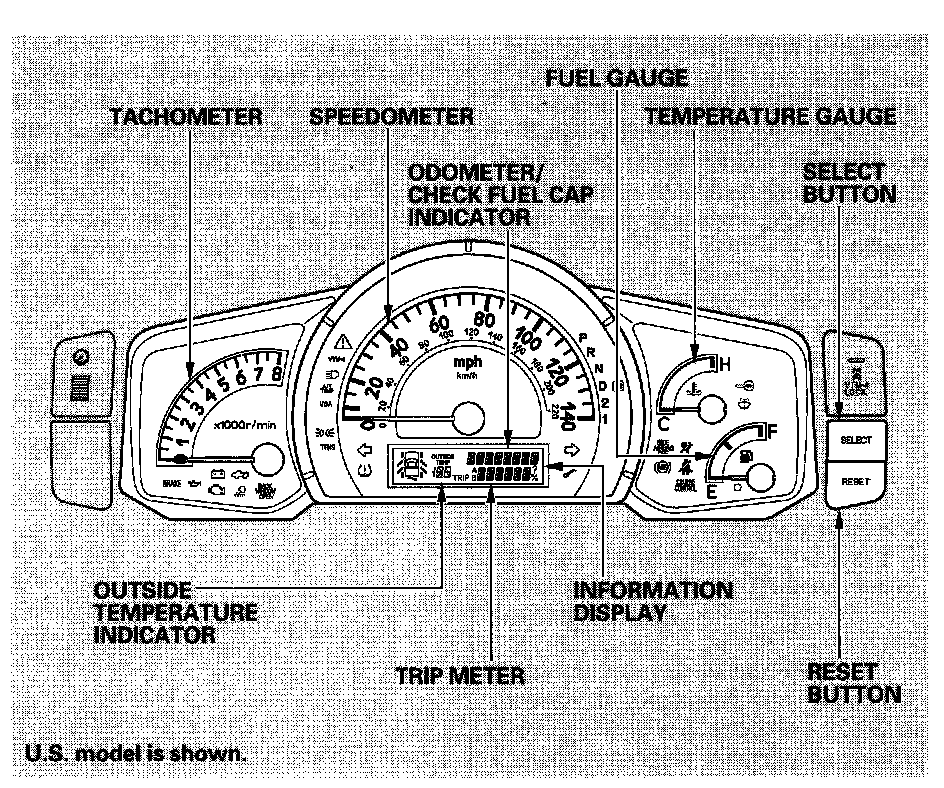
1. Turn the ignition switch to the ON (II) position.
2. Press the Select button repeatedly until the engine oil life indicator or the service message is displayed.
3. Press the Reset button for about 10 seconds. You will see a "Maint Reset" message.
4. Select the appropriaye answer, "Maint Reset > N" (NO) or "Maint Reset > Y" (YES) by pressing the Select button repeatedly. ">N" or ">Y" is displayed on the outside temperature display.
5. Select the "Maint Reset > Y" and press and hold the Reset button again to reset the engine oil life to 100.