Programming and Relearning
Updating the BCM ModuleSpecial Tools Required
- Honda diagnostic system (HDS)
- Honda interface module (HIM)
- HDS pocket tester
Use this procedure when you have to update the BCM module during a troubleshooting procedure.
The BCM module has the programs for the IMA battery condition monitor.
Update the BCM module if its program is not the latest.
NOTE:
- To ensure the latest programs are installed, do a BCM module update whenever the BCM module is substituted or replaced.
- Select IMA motor and/or IMA battery in the HIM BCM module update menu.
- You can not update a BCM module with the program it already has. It will only accept a new program.
- Before you update the BCM module, make sure the vehicle's battery is fully charged.
- Do not turn the ignition switch OFF while updating the BCM module. If you turn the ignition switch OFF before completion, the BCM module can be damaged.
- To prevent BCM module damage, do not operate anything electrical (audio system, brakes, A/C, power windows, door locks, etc.) during the update.
- If you need to diagnose the Honda interface module (HIM) because the HIM's red (#3) light came on or was flashing during the update, leave the ignition switch in the ON (II) position when you disconnect the HIM from the data link connector (DLC). This will prevent BCM module damage.
1. Turn the ignition switch ON (II). Do not start the engine.
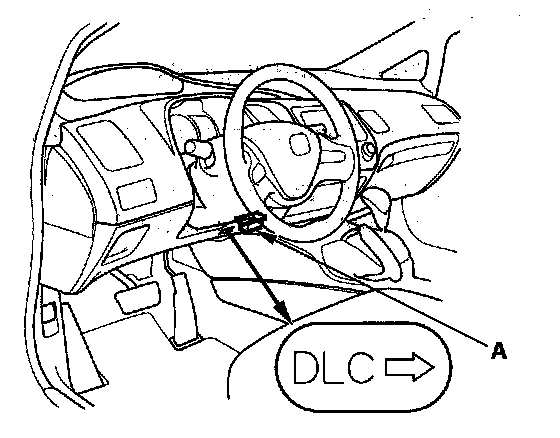
2. Connect the HDS or the Honda Interface Module (HIM) to the data link connector (DLC) (A) located under the driver's side of dashboard.
3. Do the BCM module update procedure as described on the HIM label and in the CM update system.
How to Substitute the BCM Module
Special Tools Required
- Honda diagnostic system (HDS)
- Honda interface module (HIM)
- HDS pocket tester
Use this procedure when you have to substitute a known-good BCM module during a troubleshooting procedure.
1. Remove the BCM module.
2. Install a known-good BCM module.
NOTE: If the IMA battery level gauge (BAT) displays no segments, start the engine, and hold it between 3,500 rpm and 4,000 rpm without load (in Park or neutral) until the BAT displays at least three segments.