Navigation Display Buttons Do Not Work or Respond Properly
Special Tools RequiredSCS service connector 07PAZ-0010100
Navigation display buttons do not work or respond properly
NOTE:
- Always check connectors for poor contact and poor pin fits.
- Before troubleshooting, get the navigation and radio anti-theft codes.
- Before troubleshooting, write down all the audio presets and re-enter them after completing the repairs.
- Always verify the concern and compare the system operation to a known-good car with the same software loaded whenever possible. If the concern is duplicated in the known-good car, then it can be considered a characteristic of the system.
1. Turn the ignition switch ON (II).
Does the navigation display turn on?
YES - Go to step 2.
NO - Refer to troubleshooting for no picture is displayed.
2. Try to load and play a CD in the CD changer.
Does the CD display on the audio unit when the CD button is pushed?
YES - Go to step 8.
NO - Go to step 3.
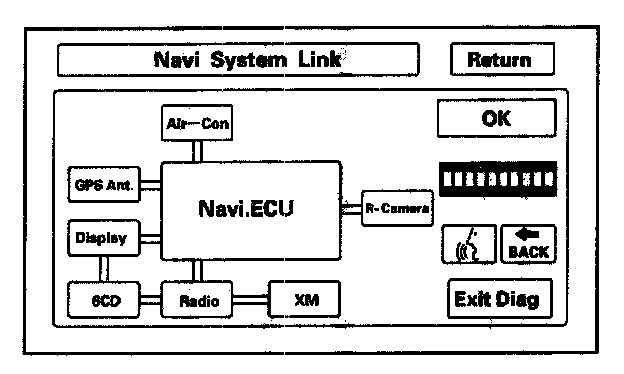
3. Do the forced starting of the display.
Are all the connections normal (green)?
YES - Check the operation of the navigation screen, press Return>Monitor Check>Touch Panel Check. If any the buttons on the screen do not respond properly, replace the navigation display.
NO -
- The display, 6CD, radio and the XM are RED: Go to step 4.
- Only some of the links are RED: Go to step 8.
4. Remove the radio without disconnecting the connectors.
5. Check for continuity between B9 and B10 of the audio unit connector B (14P) and body ground.
Is there continuity?
YES - Go to step 6.
NO - Check all pin fits, and recheck operation. If the circuit is OK, substitute a navigation control unit. If there is no change, replace the navigation display unit.
6. In this order, disconnect the connectors one at a time until you no longer have continuity to ground.
- XM receiver A (14P) connector.
- Navigation control unit B (14P) connector.
- Navigation control unit A (20P) connector.
- Navigation display A (20P) connector.
- CD changer B (14P) connector.
- CD changer A (18P) connector.
- Audio unit B (14P) connector.
7. On the connector that you disconnected and lost continuity, check for continuity to ground on each terminal listed.
- Navigation control unit B2 and B8.
- Navigation control unit A10 and A20.
- Navigation display A3 and A13.
- CD changer A5 and A15.
Is there continuity to ground?
YES - Replace the shorted harness.
NO - Replace the unit that is shorted to ground.
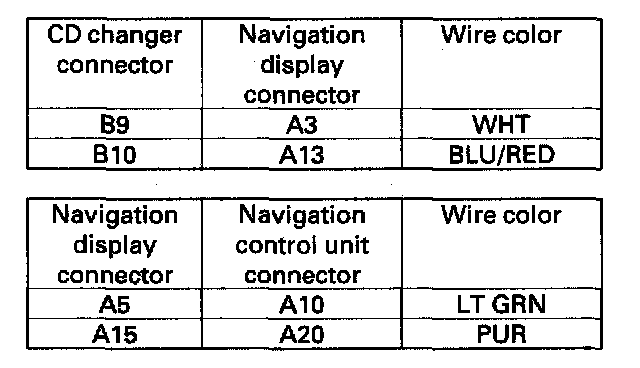
8. Check for continuity between the CD changer connector B, navigation display connector A, and navigation control unit connector A according to the table.
Is there continuity?
YES - Check all pin fits and recheck operation. If the circuit is OK, substitute a navigation control unit. If there is no change, replace the navigation display unit.
NO - Replace the faulty harness.