Symptom Troubleshooting
Navigation System Symptom Troubleshooting - Navigation frequently needs GPS initialization
Navigation frequently needs GPS initialization
NOTE:
- Check the vehicle battery condition first Battery Test.
- Check any official Honda service website for more service information about the navigation system.
- Check the connectors for poor connections or loose terminals.
1. Check if the CSF (GPS Initialization) screen is displayed every time the ignition switch is turned to ON (II).
Is CSF screen displayed every time?
YES -
The failure is duplicated, go to step 2.
NO -
Intermittent failure, the system is OK at this time.
2. Measure the voltage between audio-navigation unit connector A (24P) terminal No. 12 and body ground, and audio-navigation connector D (20P) terminal No. 11 and body ground.
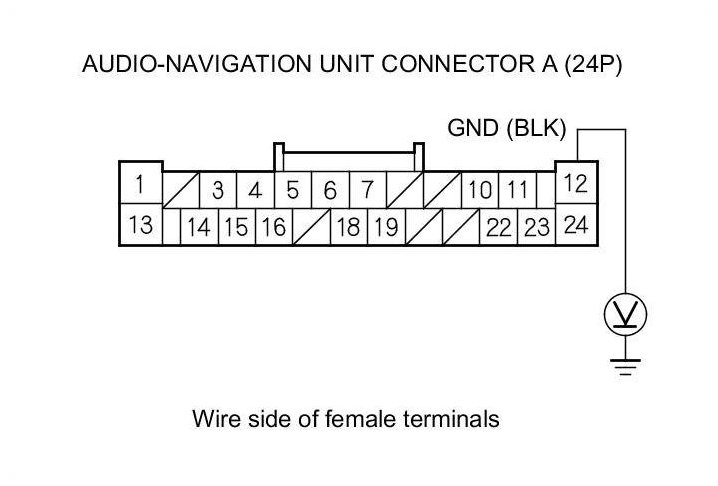
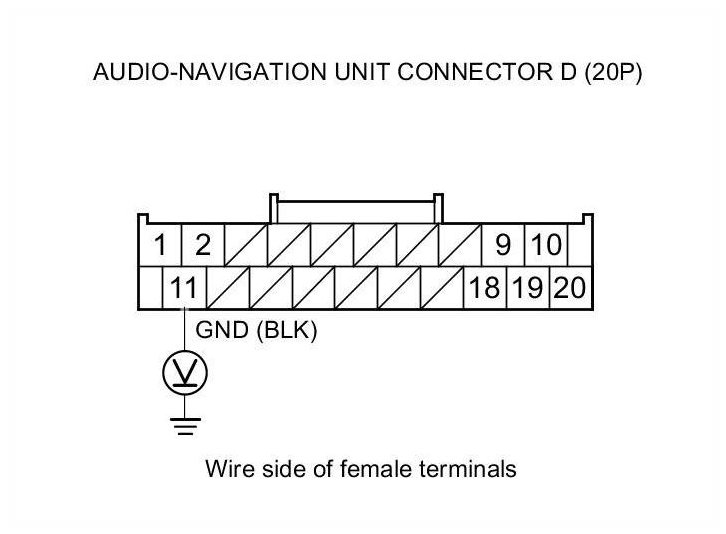
Is there less than 0.2 V on all terminals?
YES -
Go to step 3.
NO -
Repair an open or high resistance in the wire between the audio-navigation unit and body ground (G503).
3. Check for the hard error code.
Are there any navigation DTCs indicated?
YES -
Go to indicated DTC's troubleshooting Navigation System DTC Troubleshooting Index.
NO -
Replace the audio-navigation unit Audio-Navigation Unit Removal/Installation (With Navigation).