Navigation System: Adjustments
NAVIGATION: NAVIGATION SYSTEM (for DVD): ADJUSTMENT
HINT
* After replacing the multi-display or the navigation ECU, the screen's display may be affected by noise. Perform the adjustment below to reduce screen noise.
* Illustrations may differ from the actual vehicle depending on the device settings and options. Therefore, some detailed areas may not be shown exactly the same as on the actual vehicle.
* Perform both procedures below when the multi-display is replaced.
1. HOW TO PERFORM SCREEN NOISE AUTOMATIC ADJUSTMENT
(a) When either the multi-display or the navigation ECU is replaced:
(1) Turn the ignition switch to ACC and wait for at least 6 seconds to activate the diagnostic mode Navigation System (for DVD).
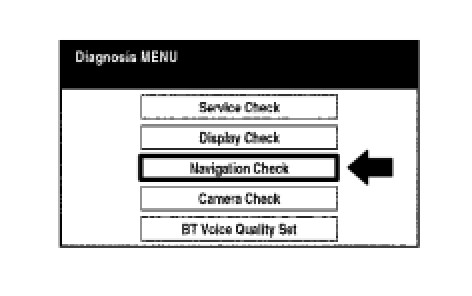
(2) Select "Navigation Check" from the "Diagnosis MENU" screen.
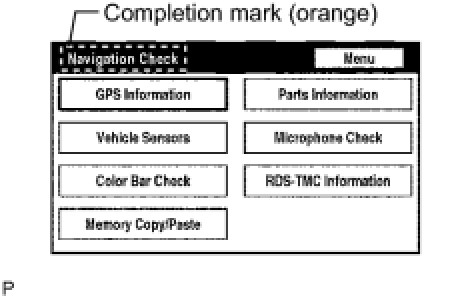
(3) The screen enters "Navigation Check" with a beeping sound. Adjustment is completed when the completion mark is displayed.
(4) Cancel the diagnostic mode Navigation System (for DVD).