Smart Access System With Push-Button Start (for Start Function)
THEFT DETERRENT / KEYLESS ENTRY: SMART ACCESS SYSTEM WITH PUSH-BUTTON START (for Start Function): HOW TO PROCEED WITH TROUBLESHOOTING
HINT
* Use these procedures to troubleshoot the push-button start function.
* *: Use the Techstream.
1. VEHICLE BROUGHT TO WORKSHOP
NEXT -- Continue to next step.
2. INSPECT BATTERY VOLTAGE
Standard voltage:
11 to 14 V
If the voltage is below 11 V, recharge or replace the battery before proceeding.
NEXT -- Continue to next step.
3. INSPECT COMMUNICATION FUNCTION OF CAN COMMUNICATION SYSTEM*
(a) Using the Techstream, check if the CAN communication system is functioning normally Diagnosis System.
Result
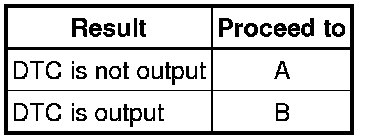
B -- GO TO CAN COMMUNICATION SYSTEM (DIAGNOSTIC TROUBLE CODE CHART) CAN Communication System
A -- Continue to next step.
4. CHECK FOR DTC*
(a) Check for DTCs and note any output DTCs Smart Access System With Push-Button Start (for Start Function).
(b) Clear the DTCs.
(c) Check whether the same DTC(s) relevant to the SFI system or smart access system with push-button start recurs by reproducing the symptoms indicated by the noted DTC(s) in the first step above.
Result
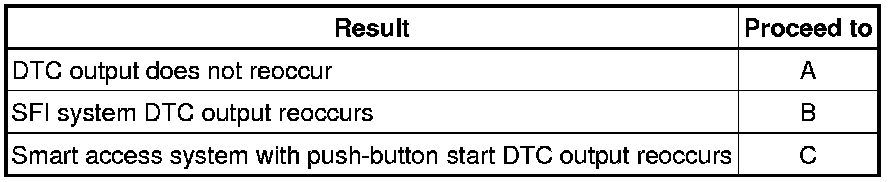
B -- GO TO SFI SYSTEM (DIAGNOSTIC TROUBLE CODE CHART) SFI System
C -- GO TO STEP 7
A -- Continue to next step.
5. PROBLEM SYMPTOMS TABLE
Result
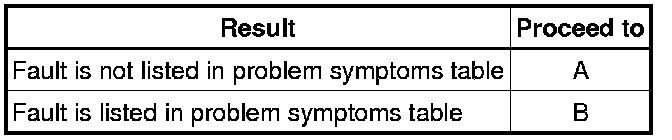
B -- GO TO STEP 7
A -- Continue to next step.
6. OVERALL ANALYSIS AND TROUBLESHOOTING*
(a) Terminals of ECU Smart Access System With Push-Button Start (for Start Function)
(b) Data List / Active Test Smart Access System With Push-Button Start (for Start Function)
NEXT -- Continue to next step.
7. ADJUST, REPAIR OR REPLACE
NEXT -- Continue to next step.
8. CONFIRMATION TEST
NEXT -- END