Programming and Relearning
SEAT WEIGHT SENSOR CALIBRATION [TWO-STEP DEPLOYMENT CONTROL SYSTEM]CAUTION:
- If any of the following work is performed, perform the seat weight sensor calibration using the WDS or equivalent.
- Replacement with a new seat weight sensor
- Replacement with a new seat weight sensor control module
- Replacement with new passenger-side seat parts
- Disassembly of the passenger-side seat
- If any of the following work is performed, perform the seat weight sensor inspection using the WDS or equivalent. (See SEAT WEIGHT SENSOR INSPECTION [TWO-STEP DEPLOYMENT CONTROL SYSTEM].)
- Removal of the passenger-side seat
- Loosening and retightening of passenger's seat fixing bolts
- Or, the vehicle is involved in a collision
1. Have a 20 kg {44 lb} and 40 kg {88 lb} weight ready to use.
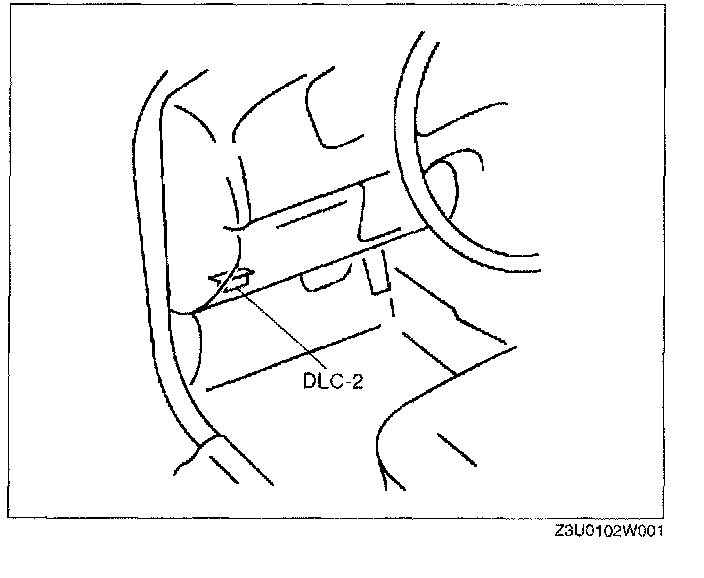
2. Connect the WDS or equivalent to the DLC-2 (16-pin).
3. Select "Powertrain" from the menu.
4. Select "Reset KAM".
5. Perform calibration following the procedures on the WDS or equivalent screen.
NOTE: When "Lightly pat the passenger seat cushion" is displayed on the WDS or equivalent screen, lightly pat horizontally approx. five times on the headrest or upper side of the seat back trim of the passenger-side front seat.