[AWD]
REAR ABS WHEEL-SPEED SENSOR INSPECTION [AWD]Installation Visual Inspection
1. Inspect the following items:
^ If there is any malfunction, replace the applicable part.
1) Excessive play of the ABS wheel-speed sensor
2) Deformation of the ABS wheel-speed sensor
3) Deformation or damage of the ABS sensor rotor
Clearance Inspection
1. Verify the clearance between the ABS sensor rotor and the ABS wheel-speed sensor.
^ If there is any malfunction, check for improper installation, and replace if necessary.
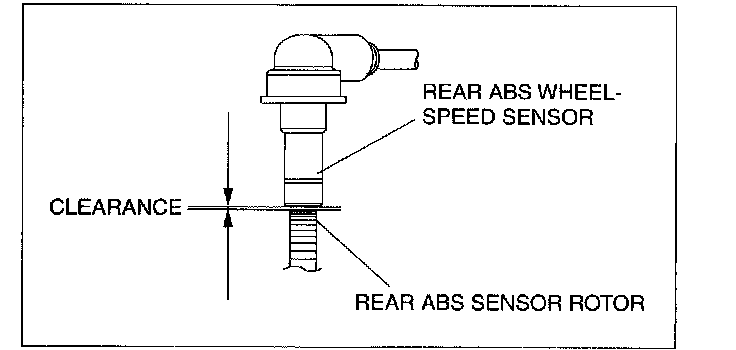
Clearance
^ 0.95-1.75 mm (0.038-0.068 in)
Sensor Output Value Inspection
1. Turn the ignition switch off.
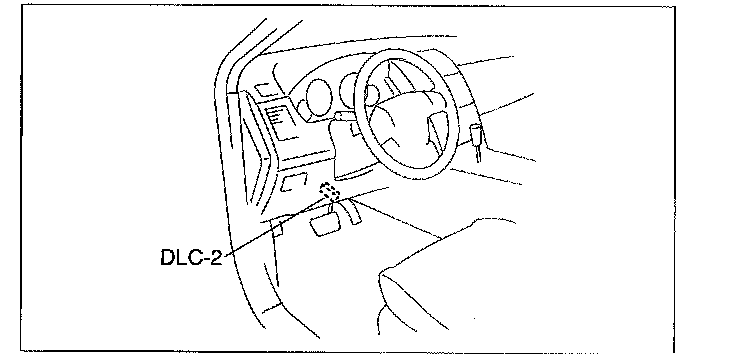
2. Connect the M-MDS to the DLC-2 connector.
3. After the vehicle is identified, select the following items from the initialization screen of the M-MDS.
^ When using the IDS (laptop PC)
1. Select the "Toolbox" tab.
2. Select "DataLogger".
3. Select "Module".
4. Select "ABS".
^ When using the PDS (Pocket PC)
1. Select "Module Tests".
2. Select "ABS".
3. Select "DataLogger".
4. Select the following PIDs using the M-MDS:
^ WSPD LR
(LR ABS wheel-speed sensor)
^ WSPD RR
(RR ABS wheel-speed sensor)
5. Start the engine and drive the vehicle.
6. Verify that the display of the M-MDS shows the same value as the speedometer.
^ If there is any malfunction, replace the rear ABS wheel-speed sensor.