Initial Inspection and Diagnostic Overview
Inspection and Verification1. Verify the customer concern.
2. Visually inspect for obvious signs of mechanical or electrical damage.
Visual Inspection Chart:
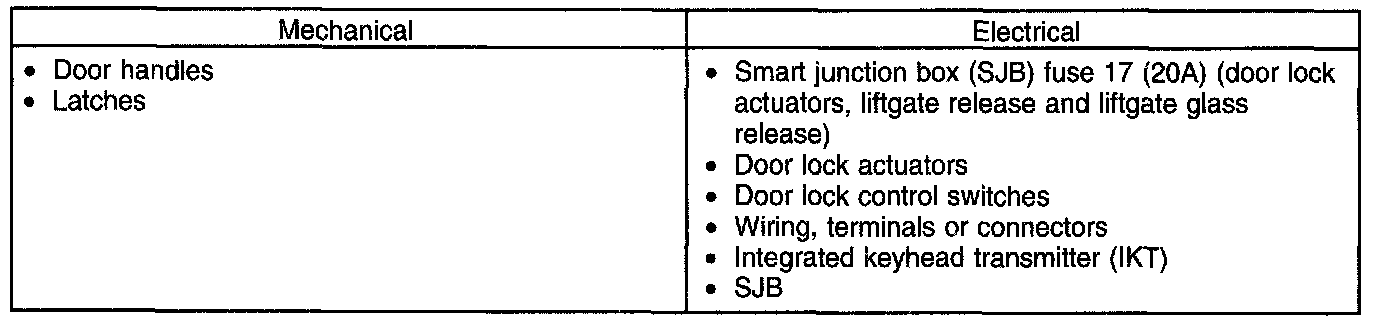
3. If an obvious cause for an observed or reported concern is found, correct the cause (if possible) before proceeding to the next step.
4. If the cause is not visually evident, connect the scan tool to the data link connector (DLC).
NOTE: Make sure to use the latest scan tool software release.
5. NOTE: The vehicle communication module (VCM) LED prove-out confirms power and ground from the DLC are provided to the VCM.
If the scan tool does not communicate with the VCM:
- Check the VCM connection to the vehicle.
- Check the scan tool connection to the VCM.
- See PINPOINT TEST 14: NO POWER TO THE SCAN TOOL, to diagnose no communication with the scan tool. Pinpoint Test 14: No Power to the Scan Tool
6. If the scan tool does not communicate with the vehicle:
- Verify the ignition key is in the ON position.
- Verify the scan tool operation with a known good vehicle.
- See PINPOINT TEST 1: THE PCM DOES NOT RESPOND TO THE SCAN TOOL OR NO HIGH SPEED CONTROLLER AREA NETWORK (HS-CAN) COMMUNICATION, to diagnose no response from the PCM. Pinpoint Test 1: The PCM Does Not Respond to the Scan Tool or No High Speed Controller Area Network (Hs-CAN) Communication
7. Carry out the network test.
- If the scan tool responds with no communication for one or more modules, see SYMPTOM TROUBLESHOOTING CHART. Symptom Related Diagnostic Procedures
- If the network test passes, retrieve and record the continuous memory DTCs.
8. Clear the continuous DTCs and carry out the self-test diagnostics for the SJB.
9. If the DTCs retrieved are related to the concern, go to Smart Junction Box (SJB) DTC Chart. Smart Junction Box (SJB) DTC Chart For all other DTCs, see DIAGNOSTIC TROUBLE CODE (DTC) CHART - B, C AND U CODES. Engine Control System
10. If no DTCs related to the concern are retrieved, see SYMPTOM TROUBLESHOOTING CHART - POWER DOOR LOCKS/KEYLESS ENTRY REMOTE TRANSMITTER. Testing and Inspection