Inspection and Verification
Inspection and Verification1. Verify the customer concern by operating the power seat or heated seat functions.
2. Visually inspect for obvious signs of mechanical and electrical damage.
Visual Inspection Chart:
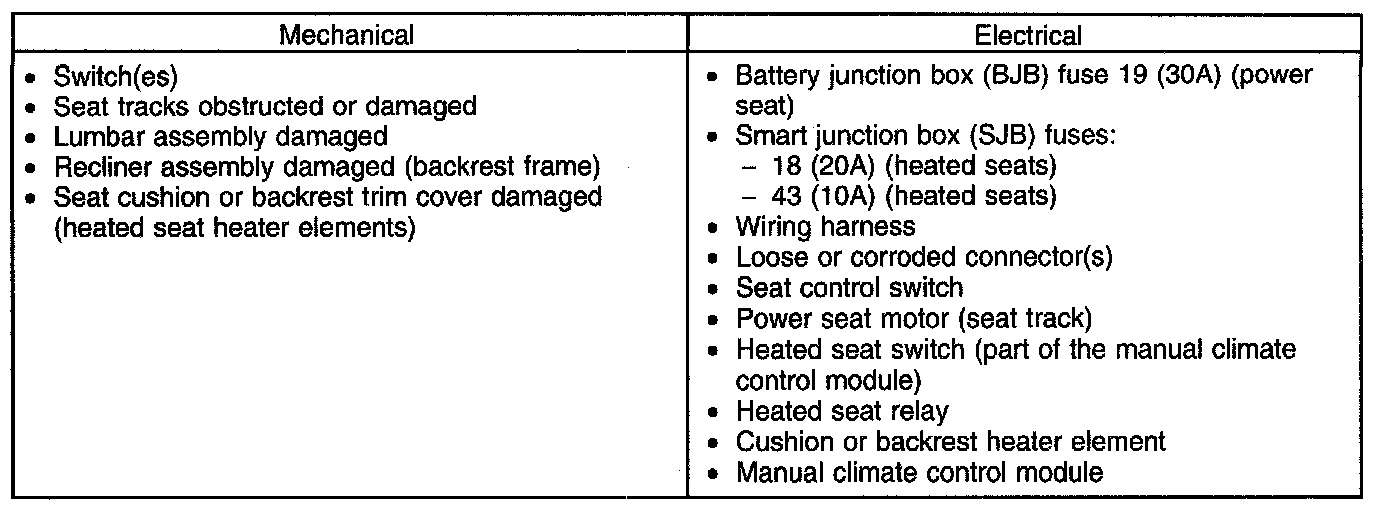
3. If an obvious cause for an observed or reported concern is found, correct the cause (if possible) before proceeding to the next step.
4. If the concern is with the power seat, verify the symptom and see SYMPTOM TROUBLESHOOTING CHART - POWER SEAT. Symptom Related Diagnostic Procedures
NOTE: Make sure to use the latest scan tool software release.
5. If the concern is with the heated seat and the cause is not visually evident, connect the scan tool to the data link connector (DLC).
6. NOTE: The vehicle communication module (VCM) LED prove-out confirms power and ground from the data link connector (DLC) are provided to the VCM.
If the scan tool does not communicate with the VCM:
- check the VCM connection to the vehicle.
- check the scan tool connection to the VCM.
- see No Power To The Scan Tool, to diagnose no communication with the scan tool. See COMMUNICATIONS NETWORK - TROUBLESHOOTING.
7. If the scan tool does not communicate with the vehicle:
- verify the ignition key is in the ON position.
- verify the scan tool operation with a known good vehicle.
- see no response from the smart junction box (SJB), manual climate control module. See COMMUNICATIONS NETWORK - TROUBLESHOOTING.
8. Carry out the network test.
- If the scan tool responds with no communication from one or more modules, see COMMUNICATIONS NETWORK - TROUBLESHOOTING.
- If the network test passes, retrieve and record the continuous memory DTCs.
9. Clear the continuous DTCs and carry out the self-test diagnostics for the manual climate control module.
10. If the DTCs retrieved are related to the concern, go to Manual Climate Control Module DTC Chart. Manual Climate Control Module DTC Chart For all other DTCs, see DIAGNOSTIC TROUBLE CODE (DTC) CHART - B, C AND U CODES. Engine Control System
11. If no DTCs related to the concern are retrieved, see SYMPTOM TROUBLESHOOTING CHART - POWER SEAT. Symptom Related Diagnostic Procedures
NOTE: Only the heated seat system related DTCs are listed. For all other manual climate control module DTCs, see DIAGNOSTIC TROUBLE CODE (DTC) CHART - B, C AND U CODES. Engine Control System