Occupant Classification Sensor - Original Equipment Removal/Installation
OCCUPANT CLASSIFICATION SENSOR - ORIGINAL EQUIPMENT REMOVAL/INSTALLATION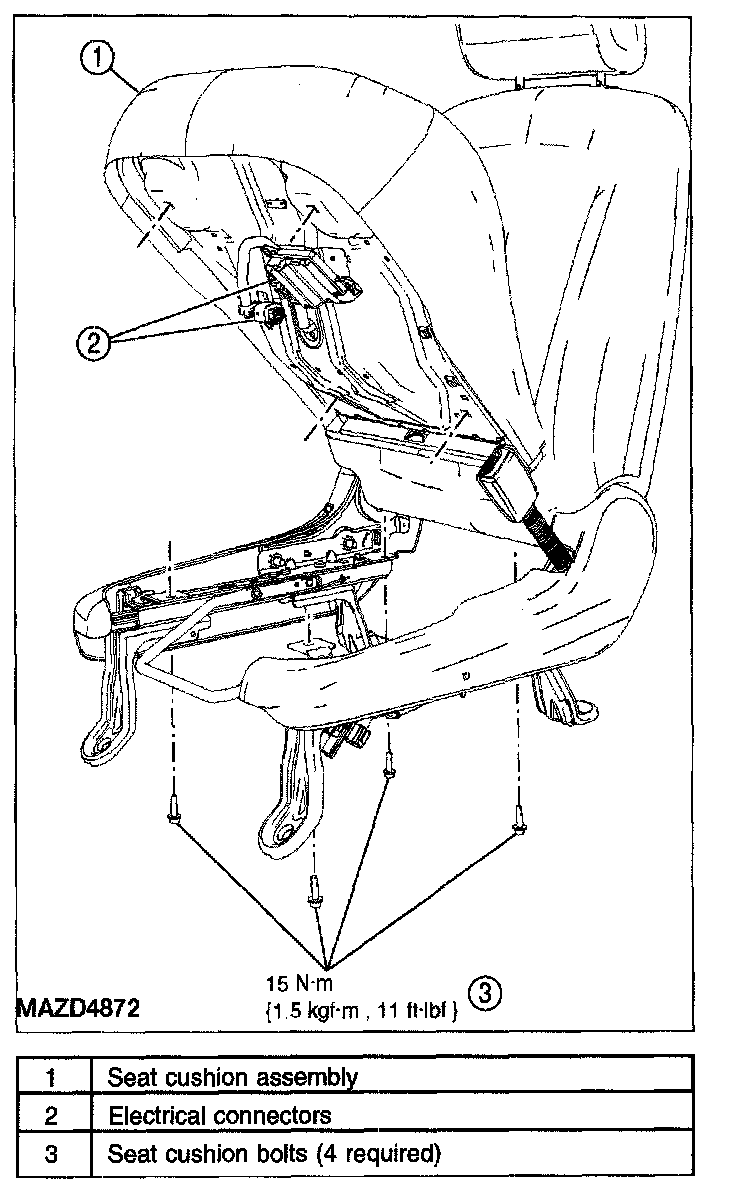
Removal
WARNING:
- Always wear safety glasses when repairing an air bag supplemental restraint system (SRS) vehicle and when handling an air bag module. This will reduce the risk of injury in the event of an accidental deployment.
- To reduce the risk of personal injury, do not use any memory saver devices.
- Do not separate the occupant classification sensor (OCS) system components. Failure to follow these instructions may result in incorrect operation of the OCS system and increase the risk of serious personal injury.
CAUTION:
- There are two occupant classification sensor (OCS) system service kits available for this vehicle (base seat and heated seat). Always make sure the correct OCS service kit is installed.
- It is necessary to rezero the OCS system when a front passenger seat cushion is disassembled, a new trim cover installed, or an OCS service kit is installed. A diagnostic tool is used to trigger the active command to carry out rezeroing of the OCS system.
NOTE:
- The heated seat element on the front passenger seat cushion is not serviceable separately. It a new heated seat element is needed on the front passenger seat cushion, a new OCS service kit equipped with a heated seat element must be installed.
- OCS system components, seat cushion foam pad, bladder with pressure sensor and electronic control unit (ECU), are calibrated to each other and are serviced as an assembly. The OCS system components are not to be installed separately. It a new OCS system, OCS system component or seat cushion foam pad are needed, a new OCS system service kit (seat cushion foam pad, bladder with pressure sensor and ECU) must be installed as an assembly.
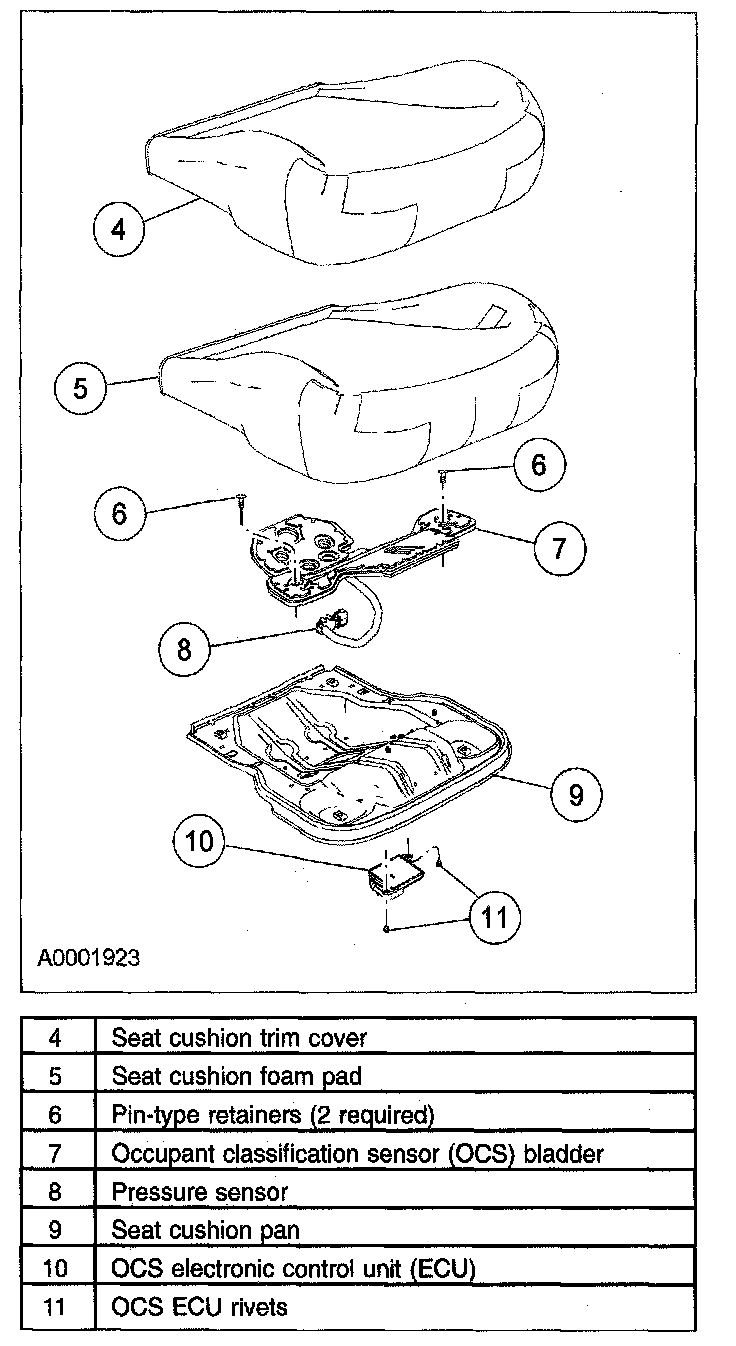
NOTE:
- To identify between a production OCS system and a service OCS system (OCS service kit), inspect the ECU electrical connector. A production OCS system allows the disconnect of the ECU electrical connector. A service OCS system (OCS service kit) has the ECU electrical connector glued to the ECU. It cannot and should not be disconnected or altered.
- If removing an OCS service kit, refer to the appropriate procedure in this section.
- The air bag warning lamp illuminates when the restraints control module (RCM) fuse is removed and the ignition switch is ON. This is normal operation and does not indicate an SRS fault.
- The SRS must be fully operational and free of faults before releasing the vehicle to the customer.
- Repair is made by installing a new part only. If the new part does not correct the condition, install the original part and perform the diagnostic procedure again.
1. Depower the system. See SUPPLEMENTAL RESTRAINT SYSTEM (SRS) DEPOWERING AND REPOWERING.
2. Remove the passenger seat.
3. Disconnect the electrical connectors and wiring clips.
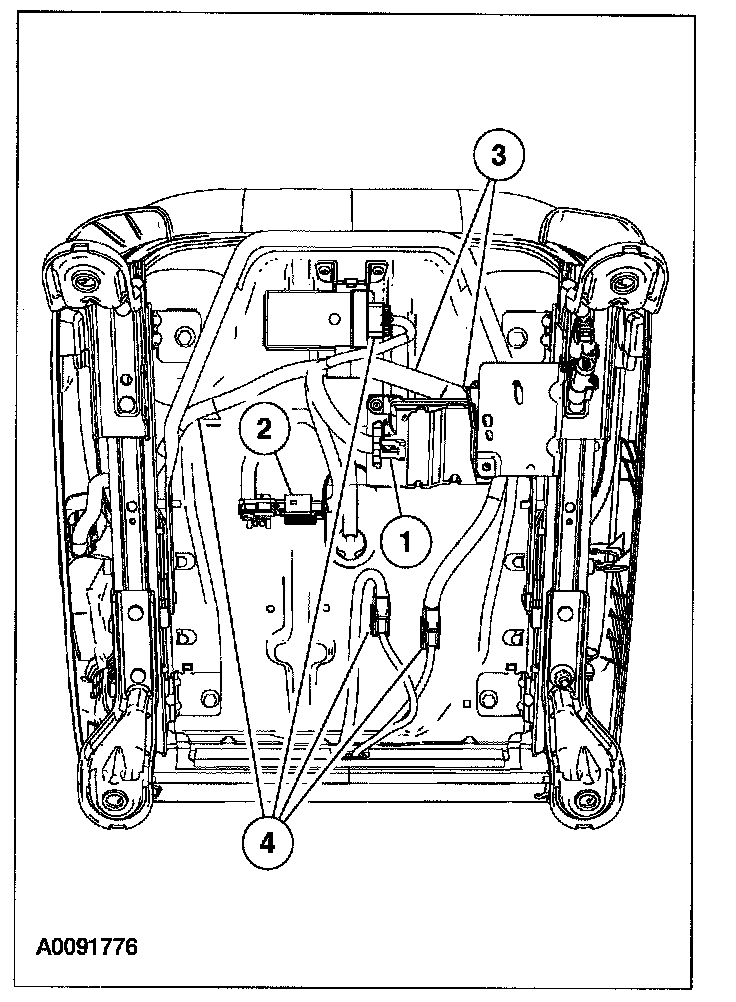
1. Disconnect the OCS ECU electrical connector.
2. Disconnect the pressure sensor electrical connector.
3. Release the two wiring clips on the wiring harness from the cushion pan.
4. If equipped with heated seats, disconnect the heated seat module electrical connector, release the wiring clip on the wiring harness from the cushion pan, and disconnect the two cushion element electrical connectors.
4. Remove the 4 seat cushion bolts retaining the seat cushion to the seat track.
5. Remove the seat cushion and pan assembly.
- To aid in removal, recline the seat.
CAUTION: While positioning the seat cushion pan and occupant classification sensor assembly, be careful not to damage any of the components. Failure to do so can result in component failure.
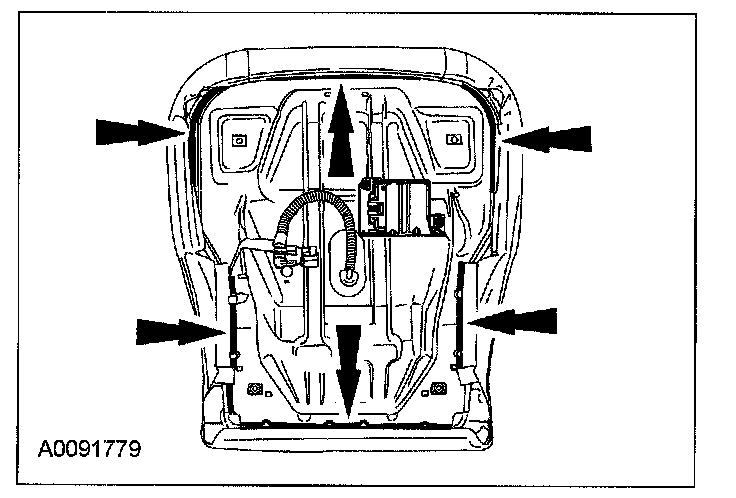
6. Detach the seat cushion trim cover J-clips from the seat cushion pan and remove the seat cushion trim cover.
CAUTION: Use care when separating the seat upholstery from the hook-and-loop strip, or the hook-and-loop strip can be torn from the seat cushion foam pad.
7. Remove the seat cushion foam pad.
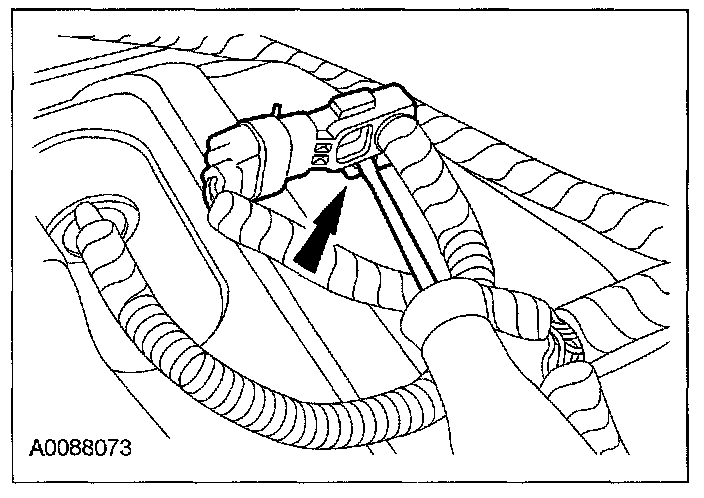
8. Bend the retaining tab away from the pressure sensor, then slide the pressure sensor off the bracket.
9. Remove the 2 rivets and the OCS ECU.
CAUTION: Care must be taken to prevent damage to the seat cushion pan when removing the rivets.
10. Remove the 2 pin-type retainers from the OCS bladder and seat cushion pan.
11. Feed the OCS hose and pressure sensor through the seat cushion pan opening and remove as an assembly with the bladder.
Installation
NOTE: If installing an OCS service kit.
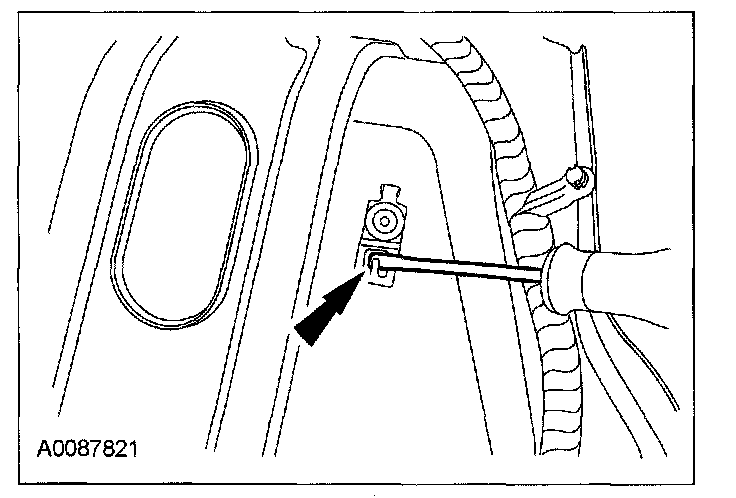
1. Bend the retaining tab back on the pressure sensor component bracket.
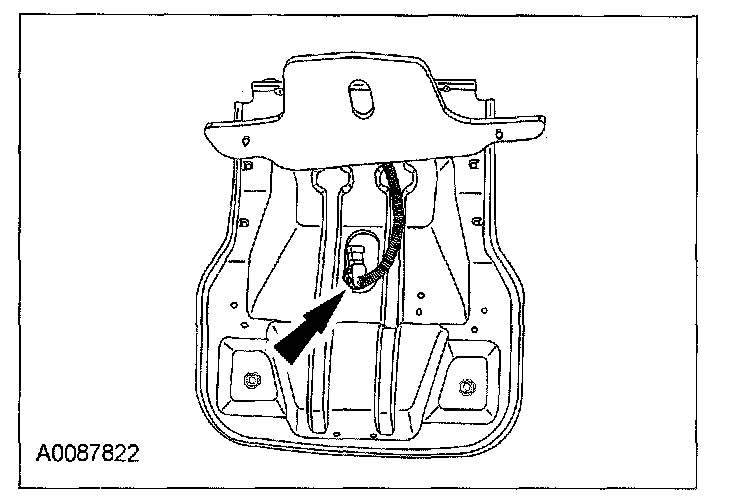
2. Feed the OCS components (pressure sensor and hose) through the seat cushion pan opening.
WARNING: Inspect the occupant classification sensor bladder, seat cushion pan and support assembly for any foreign objects, before installing the occupant classification sensor to the seat cushion pan. If any foreign objects are found, remove them. Failure to do so may result in personal injury, in the event of an air bag deployment.
CAUTION:
- Failure to route the seat occupant classification sensor components through the correct seat cushion support opening can cause component failure.
- While positioning the seat cushion pan and occupant classification sensor assembly, be careful not to damage any of the components. Failure to do so can result in component failure.
3. Align the OCS bladder to the seat cushion pan.
4. Install the 2 pin-type retainers to the OCS bladder and seat cushion pan.
5. Install the pressure sensor onto the seat cushion pan bracket, making sure the retaining tab is completely engaged.
- When installed correctly, an audible click will be heard and the pressure sensor will not be able to be removed from its bracket without disengaging the retaining tab.
NOTE: Make sure the pressure sensor hose is not kinked during installation.
6. Slide the OCS ECU into the seat cushion pan bracket and install the rivets.
- The OCS ECU must be correctly positioned and securely fastened in place. Failure to do so can set a DTC in the restraints control module (RCM).
7. Position the foam pad to the seat cushion pan.
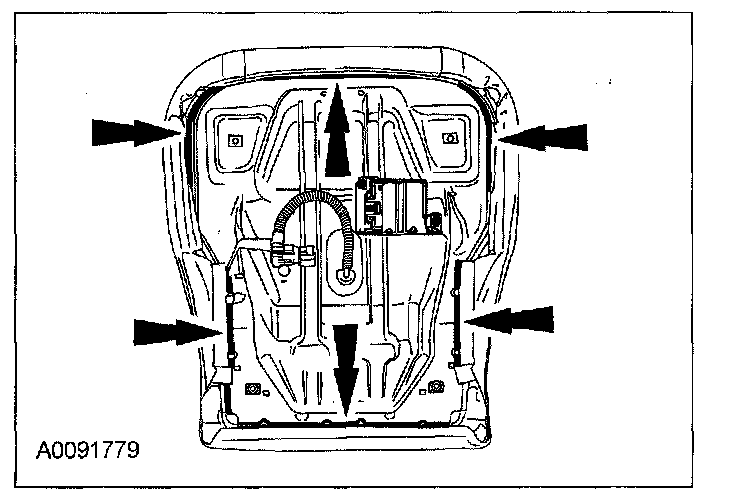
8. Install seat cushion trim cover to seat cushion foam pad and attach the J-clips.
WARNING: Inspect the seat cushion pad and seat cushion trim cover for any foreign objects, before installing the seat cushion trim cover to the seat cushion pad. If any foreign objects are found, remove them. Failure to do so may result in personal injury, in the event of an air bag deployment.
9. Position the seat cushion and pan assembly to the seat track.
- To aid in installation, recline the seat.
CAUTION: While positioning the seat cushion pan and occupant classification sensor assembly, be careful not to damage any of the components. Failure to do so can result in component failure.
10. Install the 4 seat cushion bolts retaining the seat cushion to the seat track.
11. Connect the electrical connectors and wiring clips.
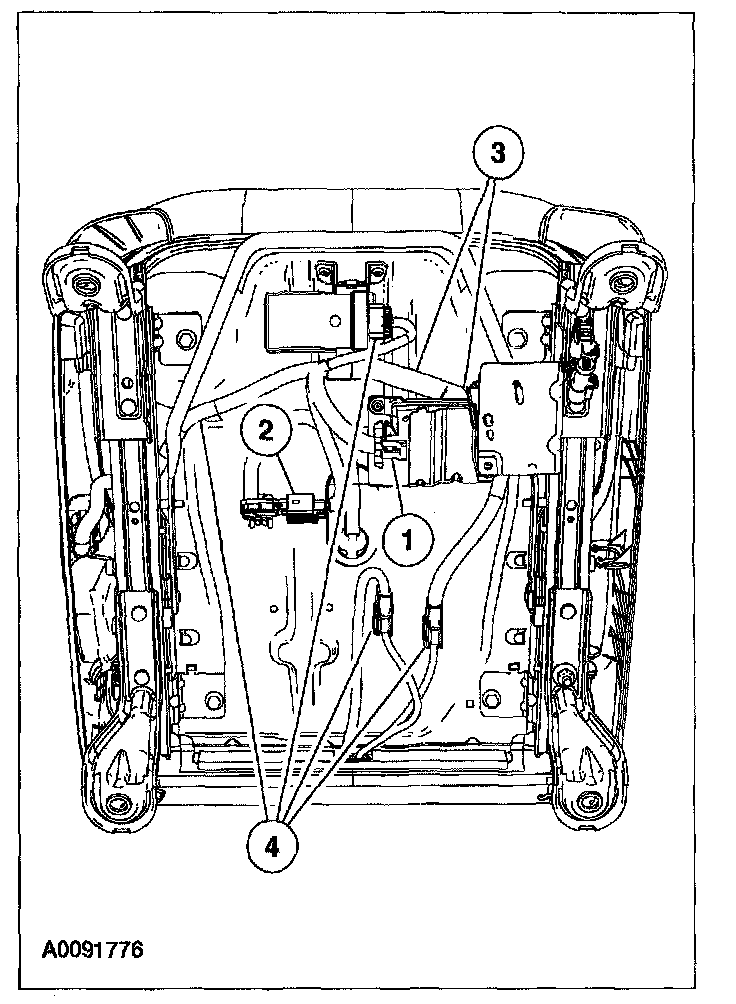
1. Connect the OCS ECU electrical connector.
2. Connect the pressure sensor electrical connector.
3. Install the two wiring clips on the wiring harness to the cushion pan.
4. If equipped with heated seats, connect the heated seat module electrical connector, install the wiring clip on the wiring harness to the cushion pan, and connect the two cushion element electrical connectors.
12. Install the passenger seat into the vehicle.
13. Repower the system. Do not prove out the system at this time. See SUPPLEMENTAL RESTRAINT SYSTEM (SRS) DEPOWERING AND REPOWERING.
14. With the front passenger seat empty, use a scan tool to trigger the active command.
CAUTION:
- The following precautions must be taken before carrying out the occupant classification sensor (OCS) system reset. Failure to follow these instructions may result in incorrect operation of the OCS system and may cause system failure.
- Make sure the OCS system components are connected and no faults are present.
- Make sure the OCS system is not at a temperature below 0 °C (32 °F) or above 45 °C (113 °F) when initiating the rezeroing process. If the vehicle has been exposed to extreme cold or hot temperatures, the vehicle must be exposed and kept at a temperature within the limits, 0 °C to 45 °C (32 °F to 113 °F) for a minimum of 30 minutes.
- Make sure a minimum 8-second time period has passed after cycling the ignition switch ON before the carrying out the OCS system reset process.
NOTE:
- For best results in carrying out the occupant classification sensor (OCS) system reset process, the OCS system should be at or near room temperature, 10 °C to 29 °C (50 °F to 85 °F).
- It the first attempt to carry out the occupant classification sensor (OCS) system reset is unsuccessful and DTC C1941 is reported, a second attempt must be made. If on the second attempt to carry out the OCS system reset is unsuccessful and DTC C1941 is reported a second time, a new OCS system service kit must be installed
- Carry out the OCS system reset
WARNING: Make sure the front passenger seat repair is complete, the seat is completely assembled, all components (head restraint, seat side shield, etc.) are correctly installed and the front passenger seat is correctly installed to the vehicle before carrying out the OCS system reset. Failure to follow these instructions may result in incorrect operation of the OCS system and increase the risk of serious personal injury or death in a collision.
CAUTION: Make sure the seat is completely assembled before carrying out the occupant classification sensor (OCS) system reset active command. Failure to follow these instructions may result in incorrect operation of the OCS system and may cause system failure.
15. Prove out the SRS as follows:
Turn the ignition key from ON to OFF. Wait 10 seconds, then turn the key back to ON and visually monitor the air bag indicator with the air bag modules installed. The air bag indicator will light continuously for approximately six seconds and then turn off. If an air bag SRS fault is present, the air bag indicator will either:
- fail to light.
- remain lit continuously.
- flash at a 5 Hz rate (RCM not configured).
The air bag warning indicator might not light until approximately 30 seconds after the ignition switch has been turned from the OFF to the ON position. This is the time required for the RCM to complete the testing of the SRS. If the air bag indicator is inoperative and a SRS fault exists, a chime will sound in a pattern of 5 sets of 5 beeps. If this occurs, the air bag warning indicator and any SRS fault discovered must be diagnosed and repaired.
Clear all RCM and OCS module DTCs using a scan tool.
NOTE: The ignition switch must be cycled after the occupant classification sensor (OCS) system reset is successful.