Diagnosis
1. COMMUNICATION WITH SCAN TOOL IS NOT POSSIBLE (COMMUNICATION WITH ALL SYSTEMS IS NOT POSSIBLE)TROUBLESHOOTING HINTS
The most likely causes for this case:
- Malfunction of the data link connector.
- Malfunction of the harness wire.
DIAGNOSIS
STEP 1. Check the power supply line at the data link connector C-69.
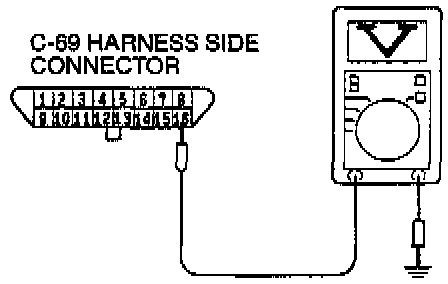
(1) Measure voltage between terminal 16 and ground.
- Voltage should be approximately 12 volts (battery positive voltage).
(2) If within specifications, go to Step 2.
(3) If not within specifications, check the intermediate connectors A-54X, D-O1 and D-06, and repair or replace if needed.
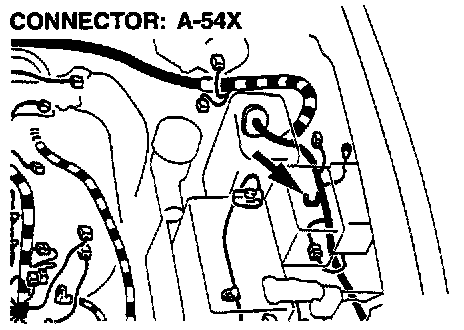
A54X
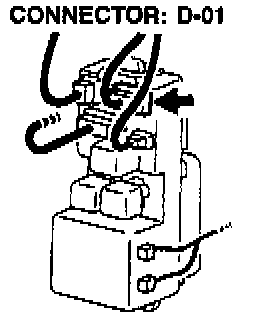
D01
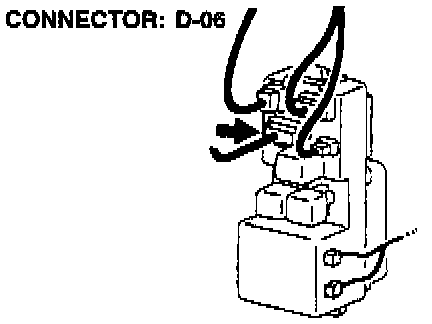
DO6
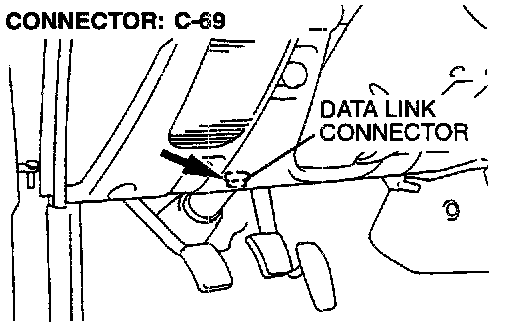
(4) If the intermediate connectors A-54X, D-O1 and D-06 are in good condition, repair the harness wire between the data link connector C-69 and fusible link (6). Then confirm that the malfunction symptom is eliminated.
STEP 2. Check the ground line at the data link connector C-69.
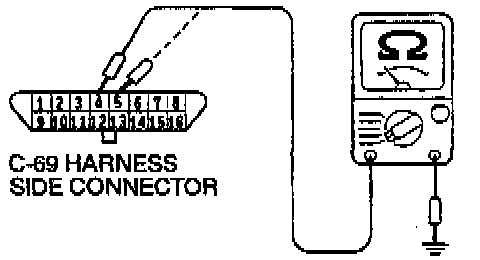
(1) Check for the continuity between terminal 4, 5 and ground.
- There should be continuity (0 ohms).
(2) If no continuity, repair the harness wire between the data link connector C-69 and the ground.
(3) If continuity, replace the scan tool. Then confirm that the malfunction symptom is eliminated.