Computer Connector
ForewordConnectors which are loose shall be rectified by removing the female terminal from connector housing and raising its lance to establish a more secure engagement. Removal of connector terminal used for MFI and INVECS-II A/T control circuit shall be done in the following manner.
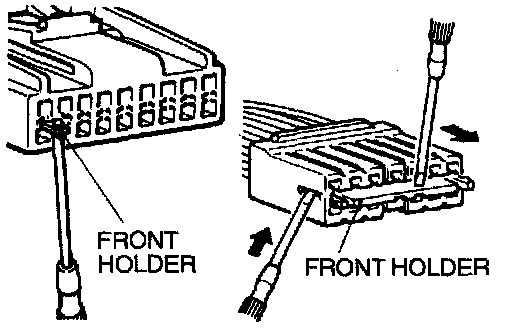
1. Insert screwdriver [1.4 mm (0.06 in.) width] as shown in the figure, disengage front holder and remove it.
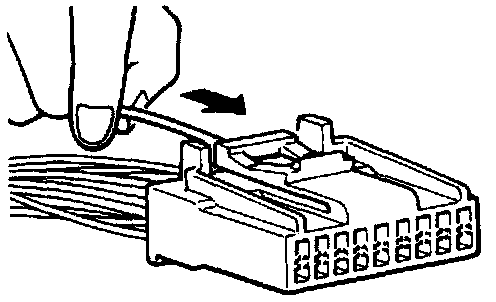
2. Insert harness of terminal to be rectified deep into connector from harness side and hold it there.
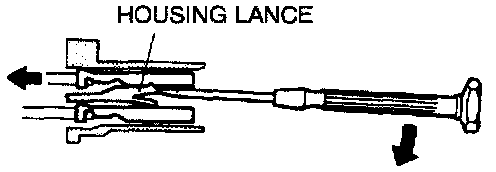
3. Insert tip of screwdriver [1.4 mm (0.06 in.) width] into connector in a manner as shown in the figure, raise housing lance slightly with it and pull out harness.
CAUTION: Tool No. 753787-1 supplied by AMP can be used instead of screwdriver.
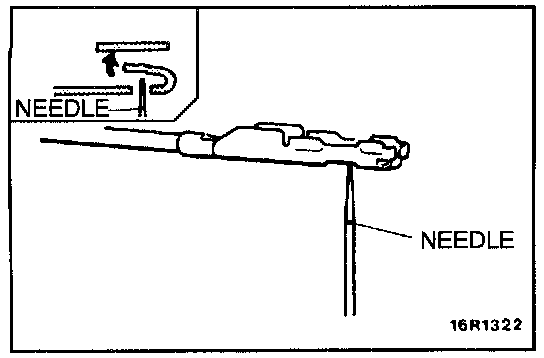
4. Insert needle through a hole provided on terminal and raise contact point of male terminal. Lightly squeeze the outer edge so the flats are parallel with the bottom.