How to Read and Erase Diagnostic Trouble Codes
HOW TO READ AND ERASE DIAGNOSTIC TROUBLE CODESRequired Special Tool:
- MB991958: Scan tool (MUT-III sub assembly)
- MB991824: V.C.I.
- MB991827: MUT-III USB cable
- MB991911: MUT-III main harness B
CAUTION: To prevent damage to scan tool MB991958, always turn the ignition switch to the "LOCK" (OFF) position before connecting or disconnecting scan tool MB991958.
NOTE: If the battery voltage is low, diagnostic trouble codes will not be set. Check the battery if scan tool MB991958 does not display.
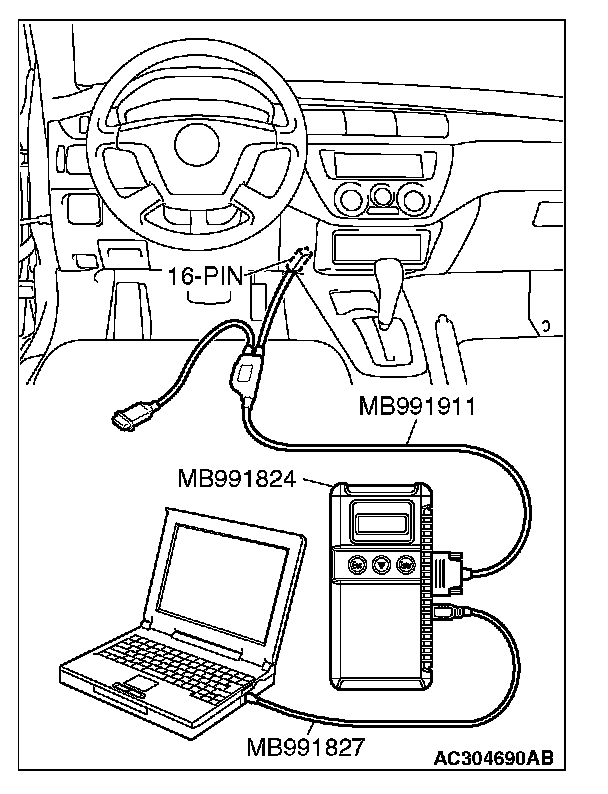
1. Connect scan tool MB991958 to the data link connector.
2. Turn the ignition switch to the "ON" position.
3. Select "Interactive Diagnosis" from the start-up screen.
4. Select "System Select."
5. Choose "AUTO-CRUISE" from the "POWERTRAIN" tab.
6. Select "Diagnostic Trouble Code."
7. If a DTC is set, it is shown.
8. Choose "DTC erase" to erase the DTC.
9. Turn the ignition switch to the "LOCK" (OFF) position.
10. Disconnect scan tool MB991958.