How to Connect the Scan Tool (MUT-III)
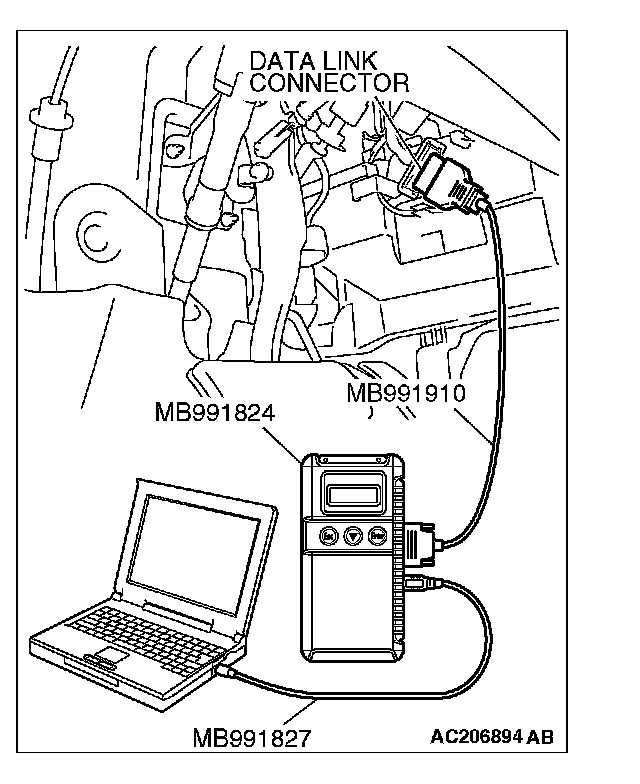
HOW TO CONNECT THE SCAN TOOL (M.U.T.-III)Required Special Tools:
^ MB991958: Scan Tool (M.U.T.-III Sub Assembly)
- MB991824: Vehicle Communication Interface (V.C.I.)
- MB991827: M.U.T.-III USB Cable
- MB991910: M.U.T.-III Main Harness A
CAUTION: To prevent damage to scan tool MB991958, always turn the ignition switch to the "LOCK" (OFF) position before connecting or disconnecting scan tool MB991958.
1. Ensure that the ignition switch is at the "LOCK" (OFF) position.
2. Start up the personal computer.
3. Connect special tool MB991827 to special tool MB991824 and the personal computer.
4. Connect special tool MB991910 to the V.C.I.
5. Connect special tool to the data link connector.
6. Turn the V.C.I. power switch to the "ON" position.
NOTE: When the V.C.I. is energized, the V.C.I. indicator light will be illuminated in a green color.
7. Start the M.U.T.-III system on the personal computer.
NOTE: Disconnect the scan tool in the reverse order of the connecting sequence, making sure that the ignition switch is at the "LOCK" (OFF) position.