Engine Controls - Swirl Control Valve Rattles: Overview
Classification:EC03-018
Reference:
NTB03-054
Date:
May 15, 2003
2003 SENTRA WITH QG18DE ENGINE AND CALIF. EMISSIONS; RATTLE NOISE FROM SWIRL CONTROL VALVE
APPLIED VEHICLE:
2003 Sentra (B15) with QG18DE engine and California emissions.
APPLIED VIN:
Vehicles built before VIN 3N1CB51D(*)3L 778675
APPLIED DATE:
Vehicles built before October 28, 2002
APPLIED ENGINE:
QG18DE
IF YOU CONFIRM:
A rattle noise from the Swirl Control Valve for 2-3 seconds after the engine is started,
DETERMINE IF:
This bulletin applies (see steps 1 and 2 of the Service Procedure).
ACTION:
Reprogram the ECM.
CLAIMS INFORMATION

Submit a Primary Failed Part (PP) line claim using the claims coding table.
IMPORTANT:
The purpose of "ACTIONS" (above) is to give you a quick idea of the work you will be performing. You MUST closely follow the entire Service Procedure as it contains information that is essential to successfully completing this repair.
SERVICE PROCEDURE
1. Determine the vehicles ECM Part Number. The ECM P/N is found by using CONSULT-II. Go to ECM P/N Selection.
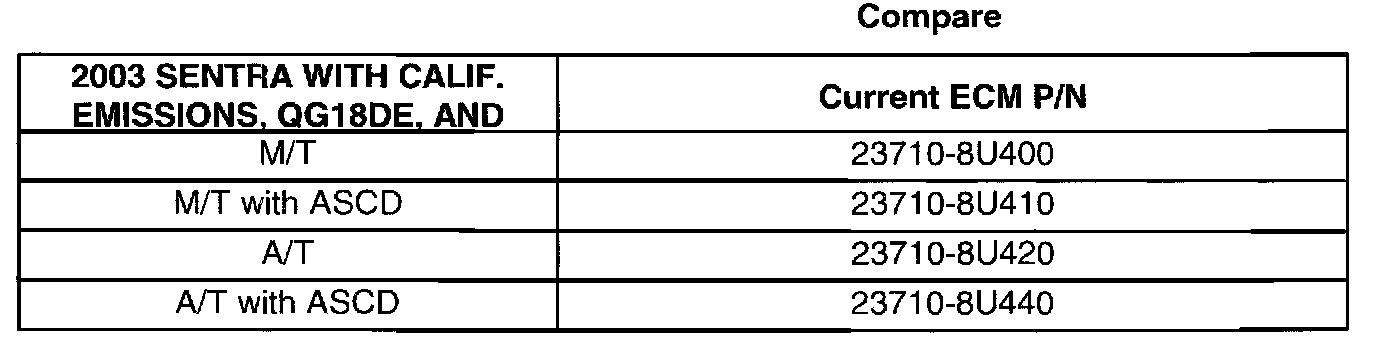
2. Compare the vehicle's ECM P/N to those shown under Current ECM P/N in the Chart.
A. If the ECM P/N in the vehicle matches one of those listed under "Current ECM P/N" in the Chart (above):
^ Perform ECM Reprogramming.
B. If the ECM P/N in the vehicle does not match one of those listed under "Current ECM P/N" in the Chart (above):
^ ECM Reprogramming is not necessary. Refer to the Service Manual (ESM) to diagnose other causes of the incident.
ECM Reprogramming:
1. Perform ECM Reprogramming to install the latest available ECM data.
^ If you are unfamiliar with ECM reprogramming refer to Attachment A shown in this bulletin.
^ For those familiar with ECM Reprogramming, perform the following:
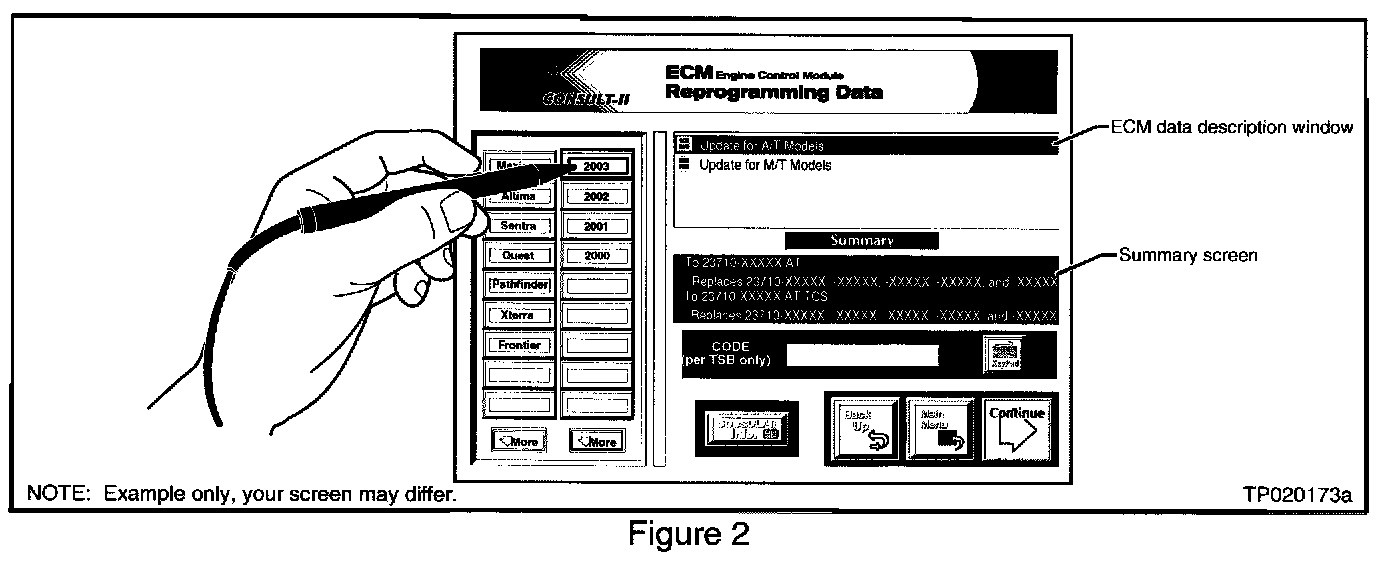
A) Select model and model year for the applied vehicle (i.e. Sentra, 2003).
NOTE:
Select the specific Model Configuration (i.e. A/T with ASCD).
B) Make a note of the "To" number listed in the "ECM Reprogramming Data" Summary screen.
NOTE:
The "To" number will read: 23710-XXXXX.
C) Press "Continue" and follow directions to perform data download from ASIST to CONSULT-II.
D) When reprogramming from CONSULT-II, select the "To" number that you made note of in step B, above.