System Setting
SYSTEM SETTING
AUTO Intake Switch Interlocking Movement Change Function
DESCRIPTION
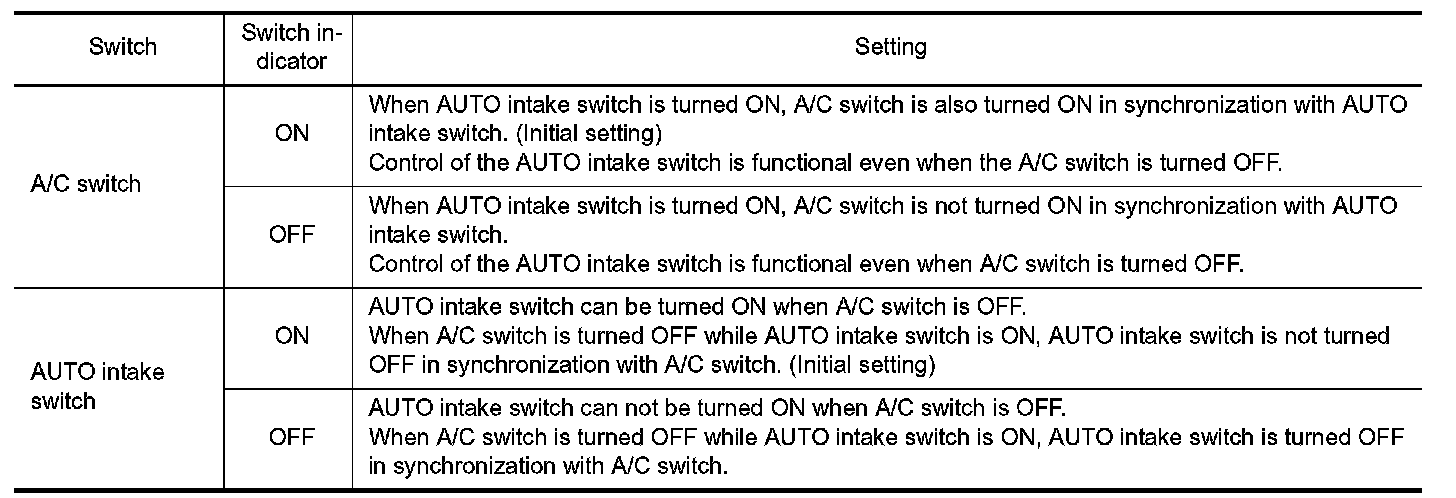
Condition for interlocking movement of AUTO intake switch and A/C switch can be changed. It is possible to set the system not to receive switch operation of AUTO intake switch when A/C switch is OFF so that the advanced climate control system is not activated. It is also possible to set the system not to turn A/C switch
ON when AUTO intake switch is pressed.
HOW TO SET
1.Starts on board self-diagnosis STEP 5 mode (Each sensor recognition temperature check; "51" or "52" is indicated on front A/C control display).
2.Press fan switch (up: +) three times and check that "8" is indicated on front A/C control display.
3.After approximately 3 seconds, the AUTO intake switch interlocking movement change function can be available.
4.Press A/C switch or AUTO intake switch to select the setting as per the following.
NOTE:
When the battery cable is disconnected from the negative terminal or when the battery voltage becomes 10 V
or less, the AUTO intake switch interlocking movement change function setting may be cancelled.