Active Test
ACTIVE TESTNOTE: Beware that if the connector to the hand-held tester becomes disconnected or a communication error occurs during the ACTIVE TEST, the vehicle could become inoperative (READY lamp OFF).
HINT: Performing an ACTIVE TEST using the hand-held tester enables components including the relay, VSV, and actuator, to be operated without removing any parts. Performing an ACTIVE TEST as the first step of troubleshooting is one method to shorten diagnostic time.
It is possible to display items in the DATA LIST during the ACTIVE TEST.
a. Connect the hand-held tester to the DLC3.
b. Turn the power switch ON (IG).
c. Turn the hand-held tester ON.
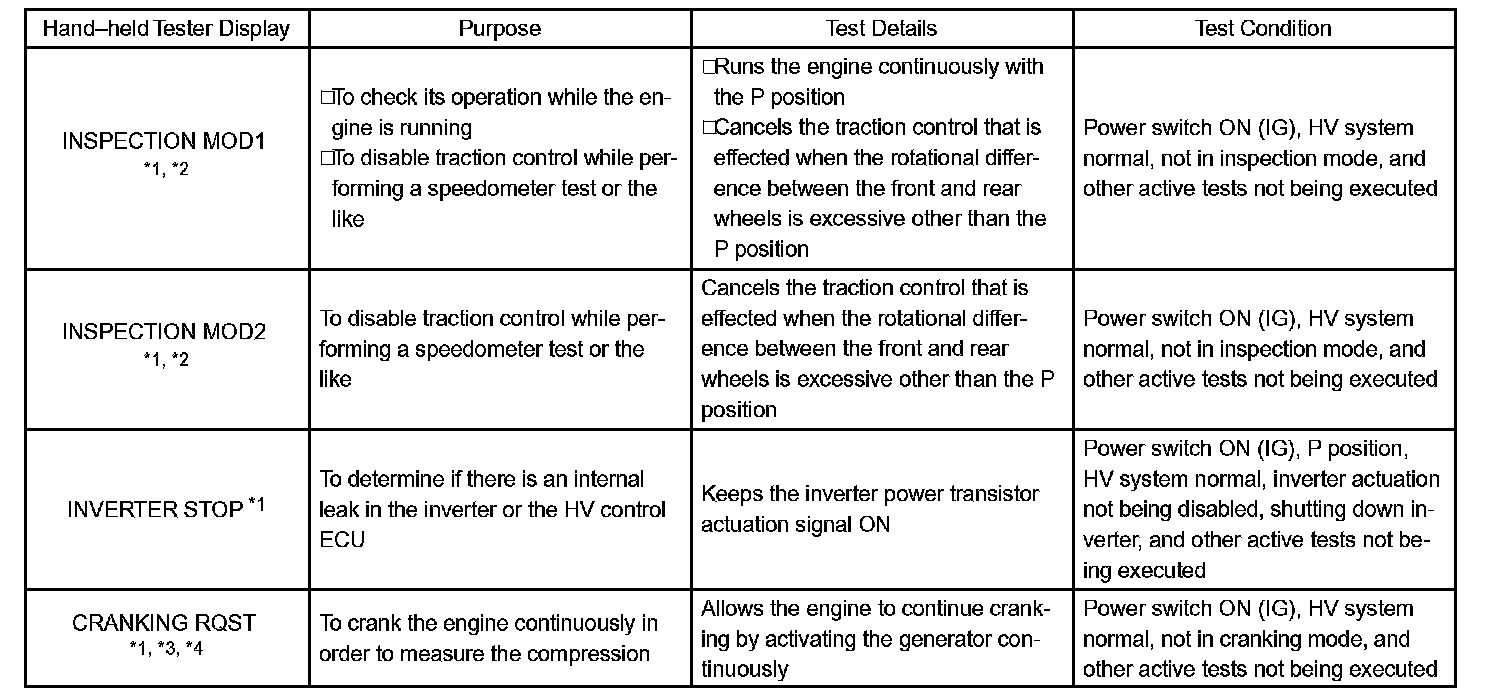
d. Select the following menu items: DIAGNOSIS / OBD/MOBD / HV ECU / ACTIVE TEST.
e. According to the display on the tester, perform ACTIVE TEST.
NOTE:
*1: The hand-held tester displays a communication error and the vehicle's READY lamp turns OFF when the ACTIVE TEST is completed. Therefore, in order to use the tester again, turn the power switch OFF, and restart by turning it ON.
*2: After turning on INSPECTION MOD1 or MOD2, push the power switch, depressing the brake pedal.
*3: After turning on CRANKING RQST, push the power switch, depressing the brake pedal. To stop engine cranking, push the power switch again.
*4: CRANKING RQST may not be activated depending on the condition of the engine or the HV battery.