Body Control Systems: Testing and Inspection
CUSTOMIZE PARAMETERSHINT: The following items can be customized.
NOTE:
- When the customer requests a change in a function, first make sure that the function can be customized.
- Be sure to make a note of the current settings before customizing.
- When troubleshooting a function, first make sure that the function is set to the default setting.
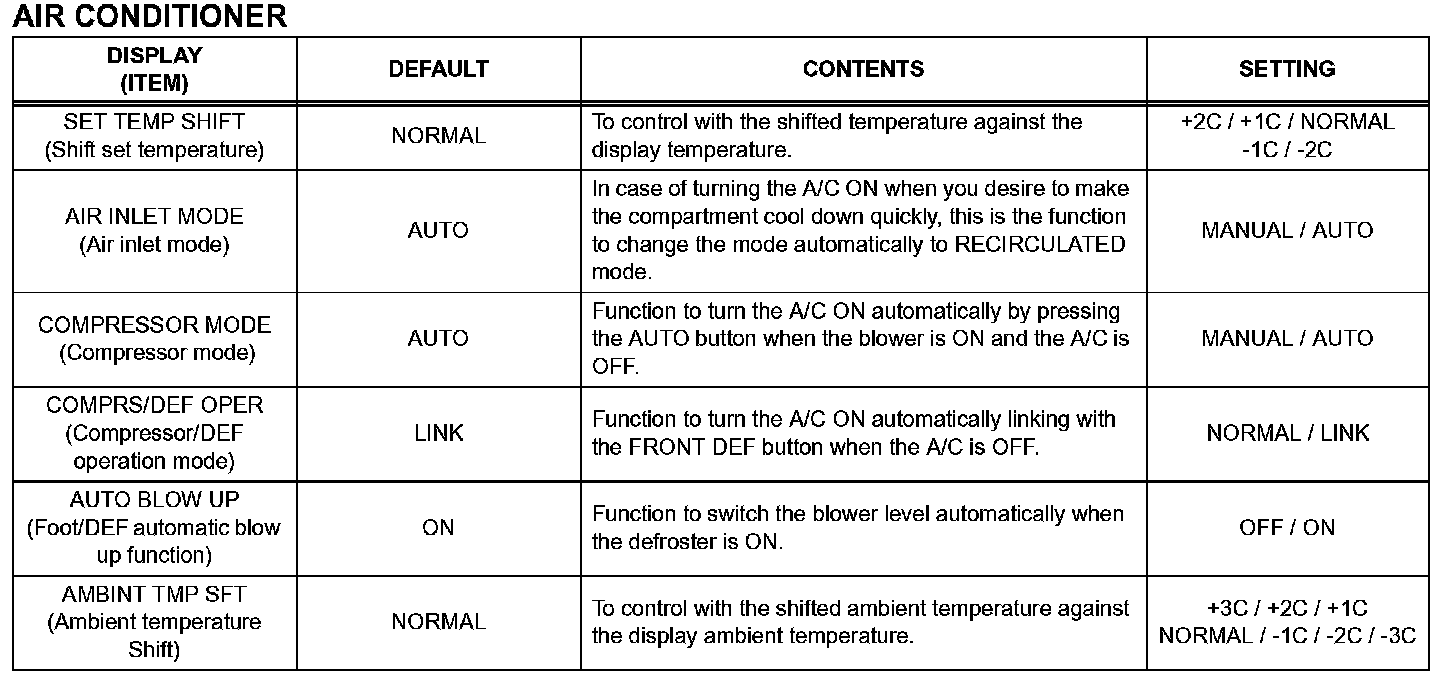
1. AIR CONDITIONING SYSTEM
HINT: The given items can be customized.
NOTE:
- After confirming whether the items of the customer's request are applicable or not for the customized items, perform the customize operation.
- Be sure to record the current value before customizing.
- In case of performing the troubleshooting, pay attention as there is a possibility that the function is set to OFF by customizing. (Example: In case of the symptom in which "The wireless operation does not function" is displayed, check that the wireless operation is not set to OFF by customizing, then perform the troubleshooting.)
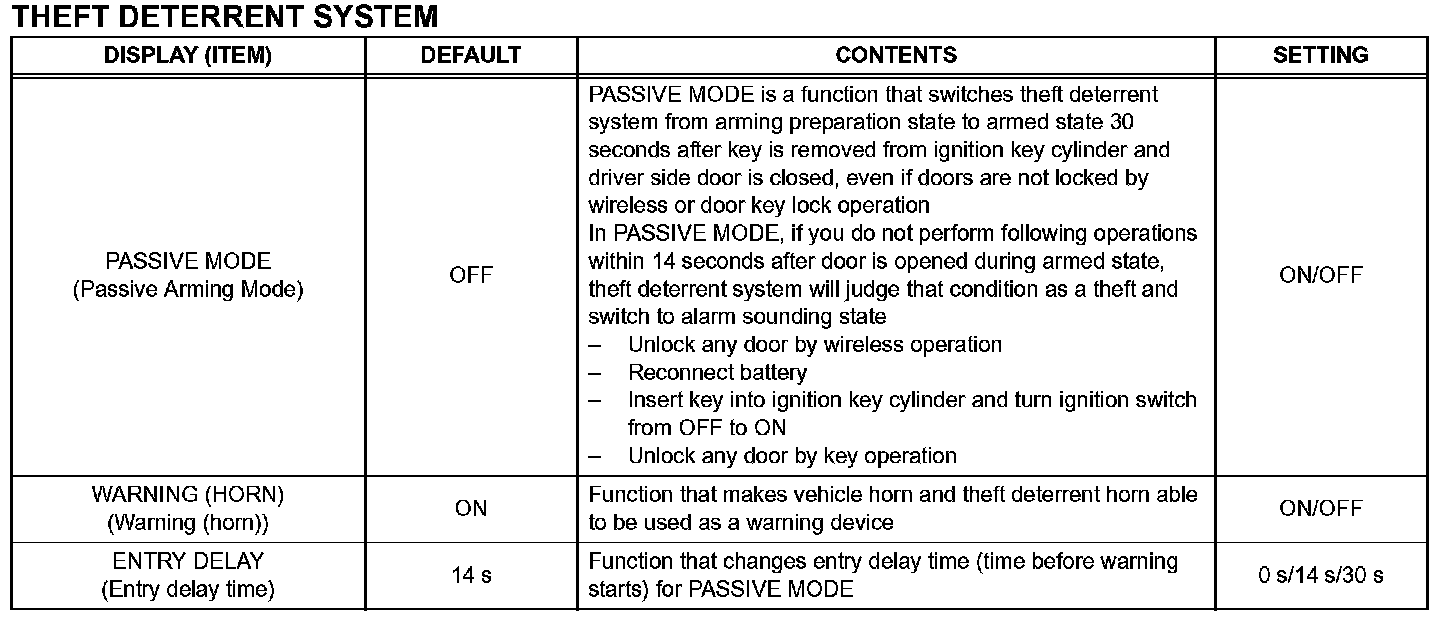
2. THEFT DETERRENT SYSTEM
HINT: The given items can be customized.
NOTE:
- After confirming whether the items requested by the customer are applicable or not for customization, perform customizing operations.
- Be sure to record the current settings before customization.
- When troubleshooting, make sure that the item in question is not set to "OFF" as a result of customization (Example: For the system, "the wireless function does not operate", first check that the wireless function is not set to "OFF", then perform troubleshooting).

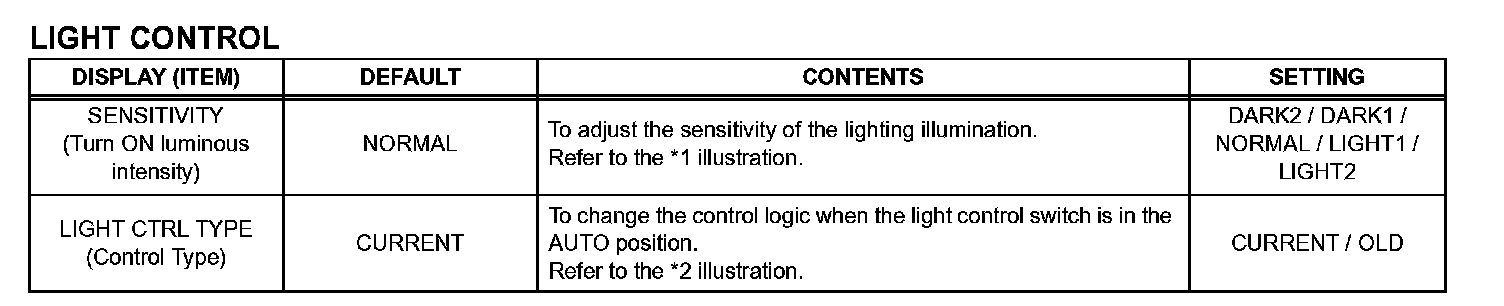
3. LIGHTING SYSTEM
HINT: The given are the possible items to be customized.
NOTE:
- After confirming whether the items of the customer's request are applicable or not for the customized items, perform the customize operation.
- Be sure to record the current value before customizing.
- In case of performing the troubleshooting, pay attention as there is a possibility that the function is OFF by customizing. (Example: In case of the symptom in which "The wireless operation does not function", check that the wireless operation is not OFF by customizing, then perform the troubleshooting.)


HINT: Sensitivity adjustment can hardly be confirmed. Please check by customer's actual driving.
**1: The new one has the logic to light up two times brighter than the old logic.
**2: Delay time until the headlight is turned on when it suddenly gets dark.
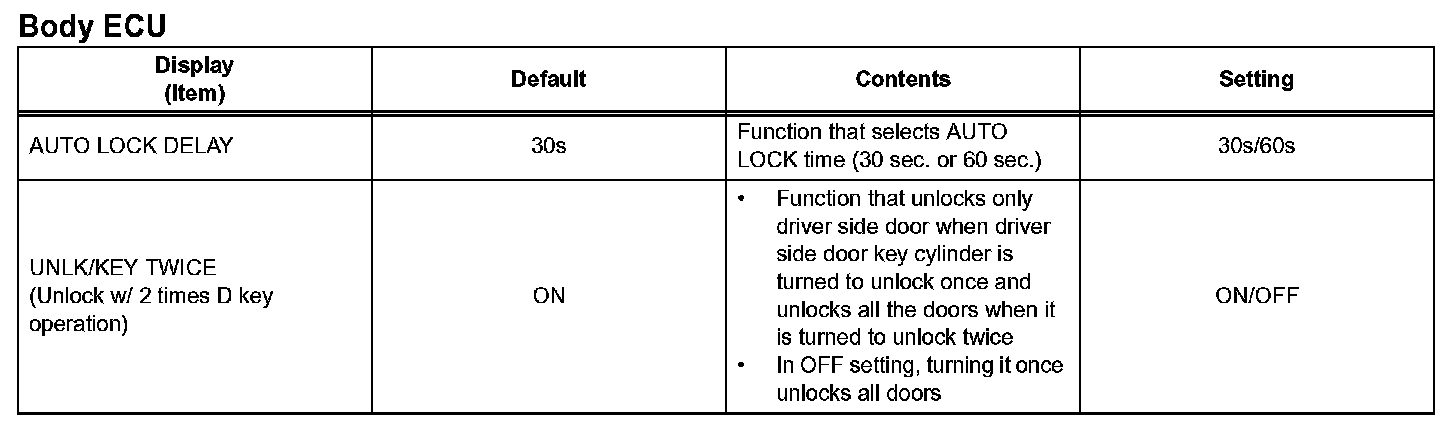
4. POWER DOOR LOCK CONTROL SYSTEM
CUSTOMIZING FUNCTION WITH INTELLIGENT TESTER (REFERENCE)
HINT: The given items can be customized.
NOTE:
- After confirming whether the items requested by the customer are applicable or not for customization, perform customizing operations.
- Be sure to record the current settings before customization.
- When troubleshooting, make sure that the item in question is not set to "OFF" as a result of customization.
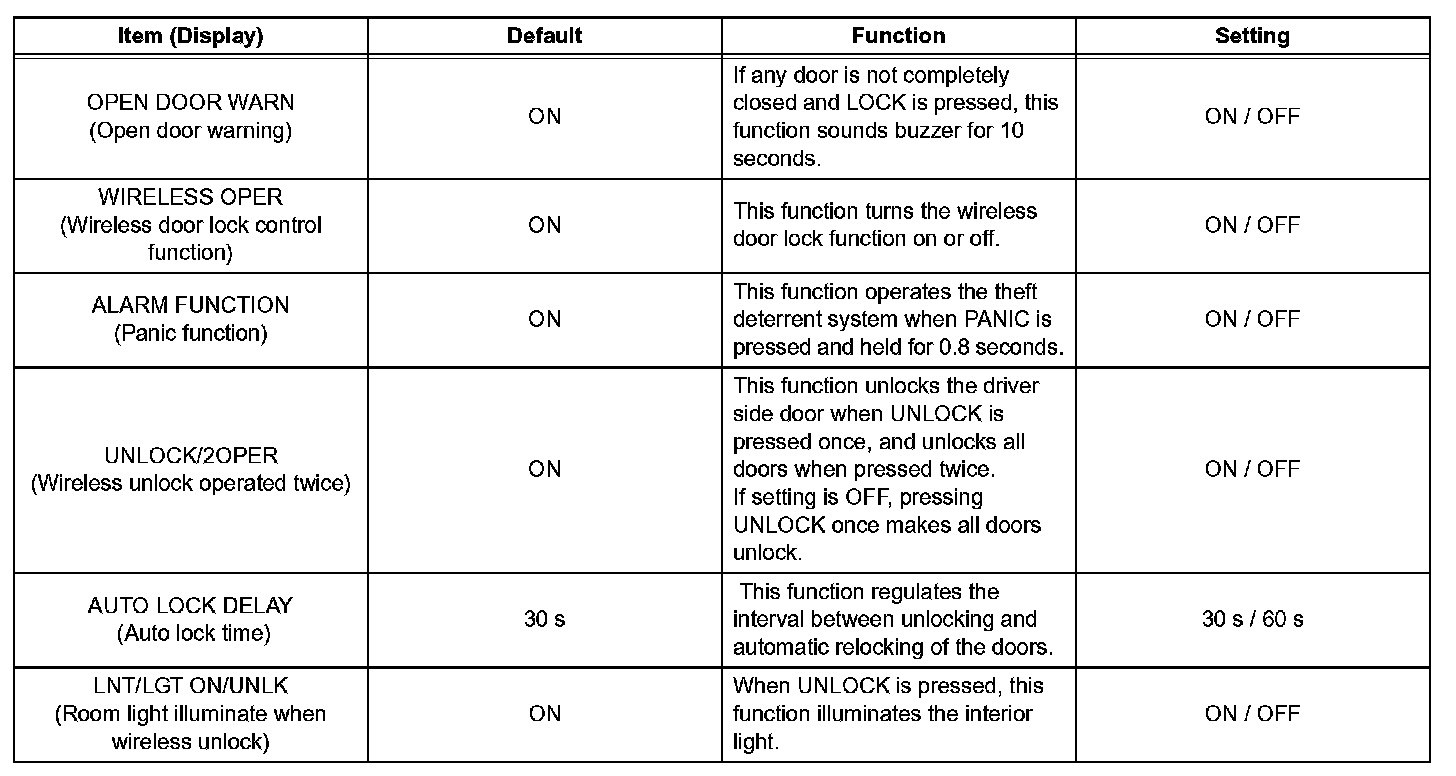
5. WIRELESS DOOR LOCK CONTROL SYSTEM
HINT: The given items can be customized.
NOTE:
- When the customer requests a change in a function, first make sure that customization of the function(s) is possible.
- Be sure to record the current settings before customizing.
- When troubleshooting a function, first make sure that the function is not set to OFF.
6. METER / GAUGE SYSTEM
HINT: The given items can be customized.
NOTE:
- Be sure to record the current value before customizing.
- When performing troubleshooting, be aware that the functions may be set to OFF by customizing. (Example: In case of the symptom in which "The wireless operation does not function", check that the wireless operation is not set to OFF by customizing, then perform the troubleshooting.)

a. Parameter
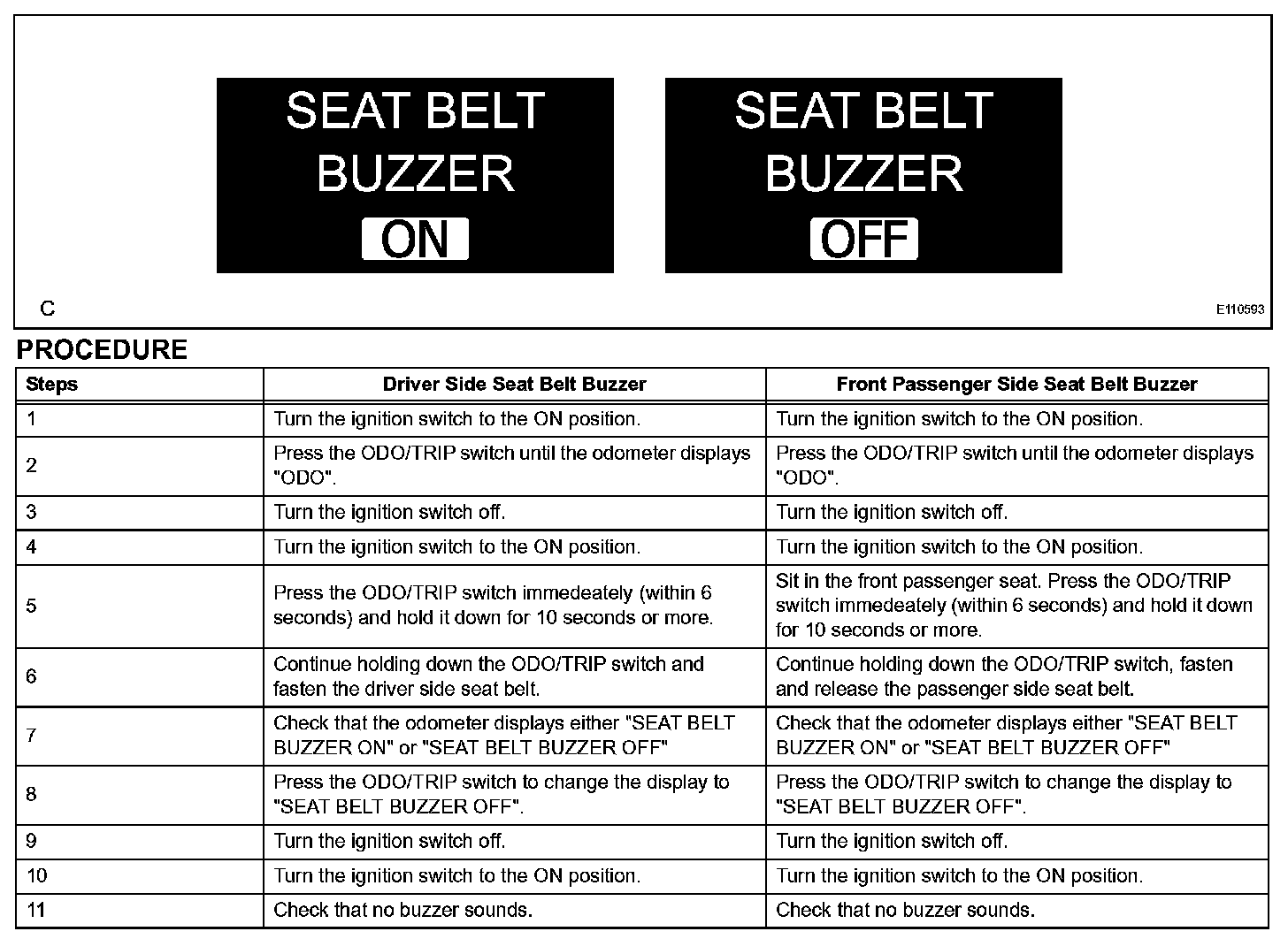
b. Buzzer ON/OFF Setting
The buzzer ON/OFF setting, which is a setting of the buzzer function of the combination meter, can disable the driver side seat belt buzzer and front passenger side seat belt buzzer.
NOTE: Basically, these buzzers should be set on for safe driving. However, perform the procedures only if it is necessary to set the buzzer off.
HINT: *: "SEAT BELT BUZZER OFF" indicates that the buzzer is OFF. "SEAT BELT BUZZER ON" indicates that the buzzer is ON. The buzzer ON/OFF setting will be finished (the odometer will display "ODO") if the ODO/TRIP switch is not operated for 10 seconds or more. In this case, perform step 11 to check that the buzzer ON/OFF setting is complete. If it is not complete, start from step 1 again.
NOTE: When either the battery cable ore the combination meter connector is disconnected, these buzzers are set on.
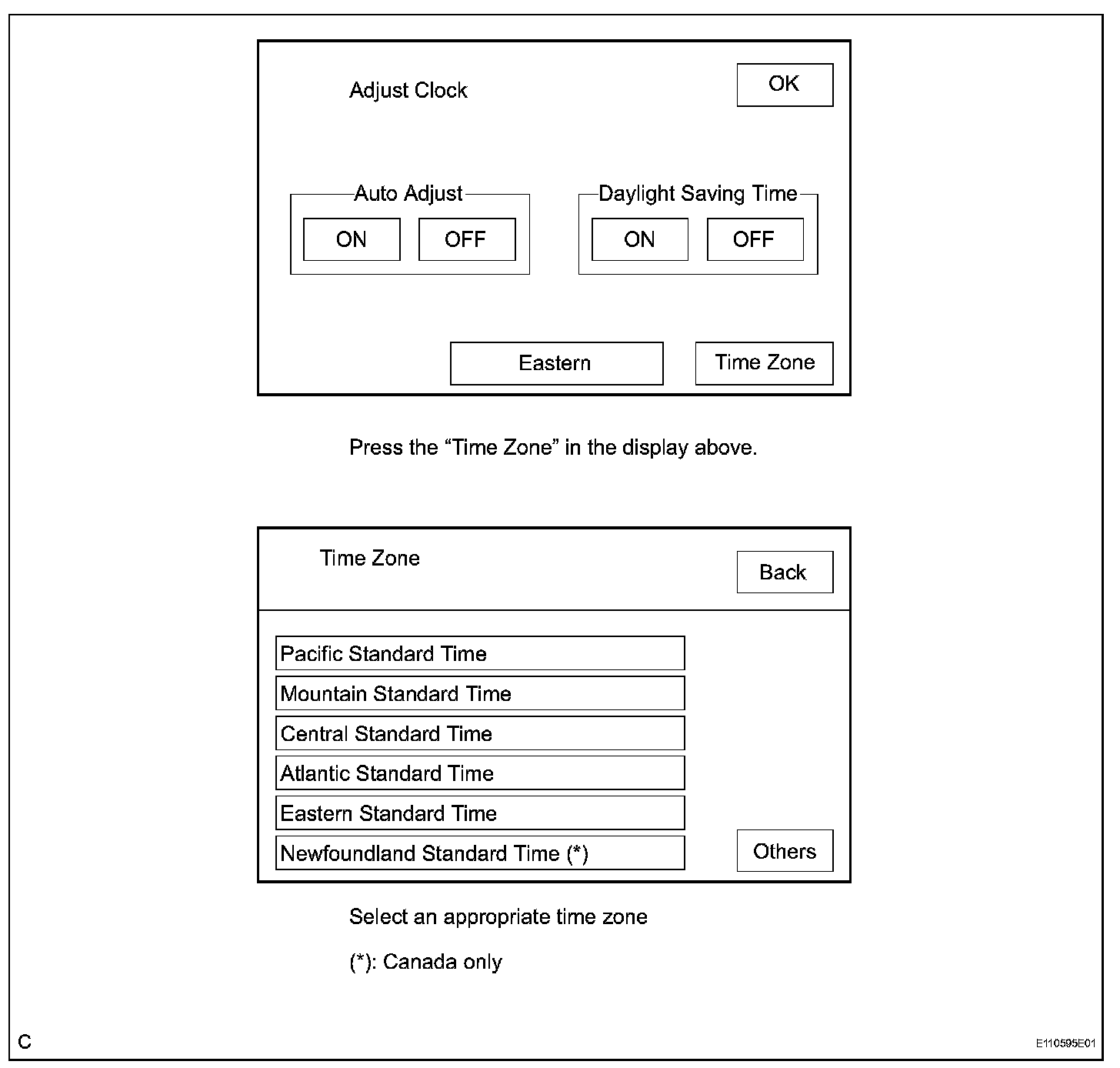
c. TIME ZONE SETTING (w/ Navigation System)
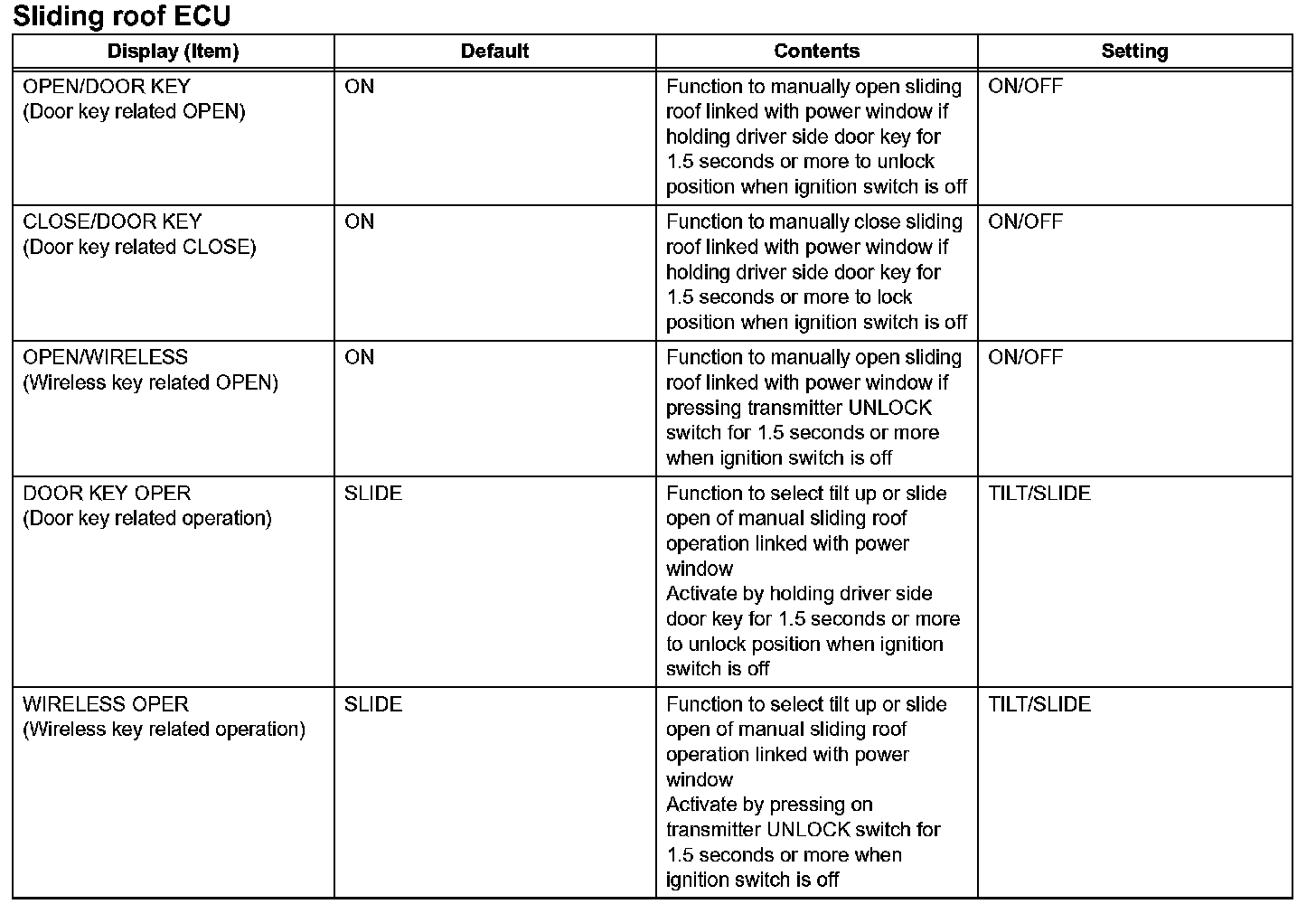
7. SLIDING ROOF SYSTEM
CUSTOMIZING FUNCTION WITH INTELLIGENT TESTER (REFERENCE)
HINT: The given items can be customized.
NOTE:
- When the customer requests a change in a function, first make sure that the function can be customized.
- Be sure to make a note of the current settings before customizing.
- When troubleshooting a function, first make sure that the function is set to the default setting.