Operation History Data
OPERATION HISTORY DATA1. OPERATION HISTORY DATA
HINT: The operation history data records the special operations performed by the driver and the number of abnormal conditions that have been input into the HV control ECU.
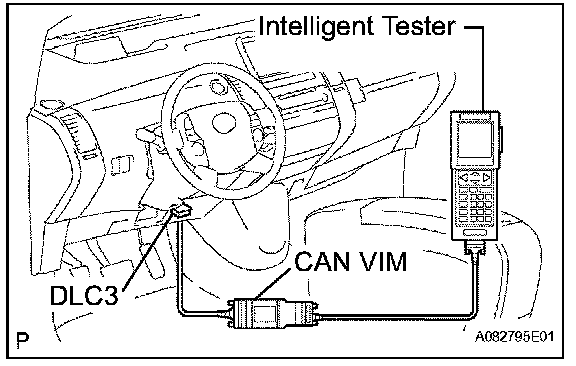
a. Connect the intelligent tester to the DLC3.
b. Turn the power switch ON (IG).
c. Turn the intelligent tester ON.
d. Enter the following menus: DIAGNOSIS / OBD/ MOBD / HV ECU / DATA LIST.
e. Select the menu to view the number of special operations or controls that have been effected.
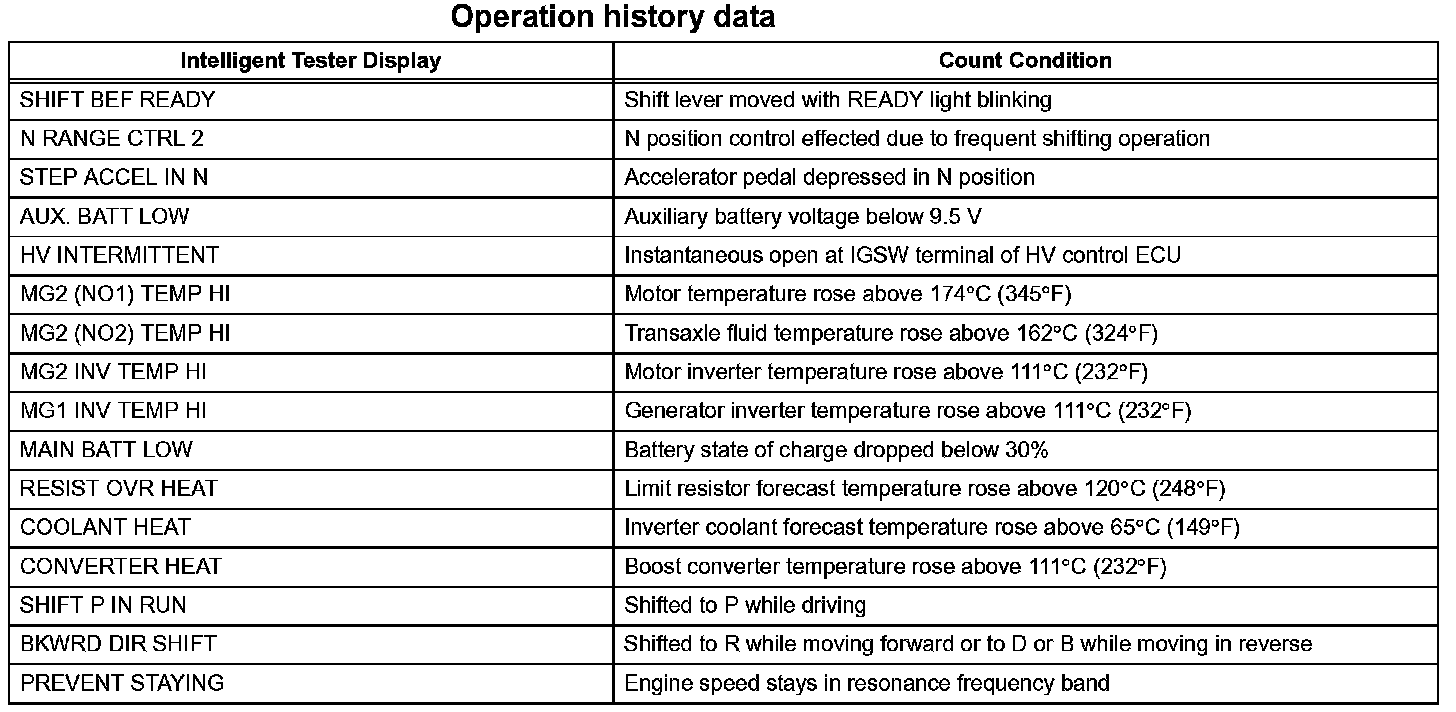
HINT:
- LATEST OPER: Among the past occurrences, the number Of special operations or controls that have been effected during the most recent 1 trip detection.
- LATEST TRIP: The number of trips after the occurrence of LATEST OPER.
- BEF LATEST OPER: The number of occurrences 1 previously from the LATEST OPER.
- BEF LATEST TRIP: The number of trips after the occurrence of BEF LATEST OPER.