Installation
NAVIGATION / MULTI INFO DISPLAY: MULTI-DISPLAY (w/ Navigation System): INSTALLATION
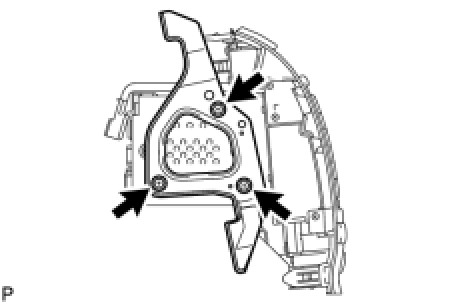
1. INSTALL NO. 2 RADIO RECEIVER BRACKET
(a) Install the bracket with the 3 bolts.
Torque : 3.0 Nm (30 kgf-cm, 26 in-lbf)
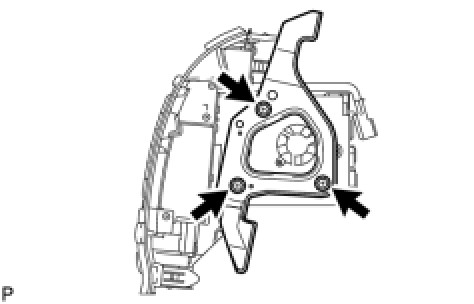
2. INSTALL NO. 1 RADIO RECEIVER BRACKET
(a) Install the bracket with the 3 bolts.
Torque : 3.0 Nm (30 kgf-cm, 26 in-lbf)
3. INSTALL MULTI-DISPLAY ASSEMBLY
(a) Connect the connectors.
(b) Insert the display and attach the 2 clips and 6 claws on its backside.
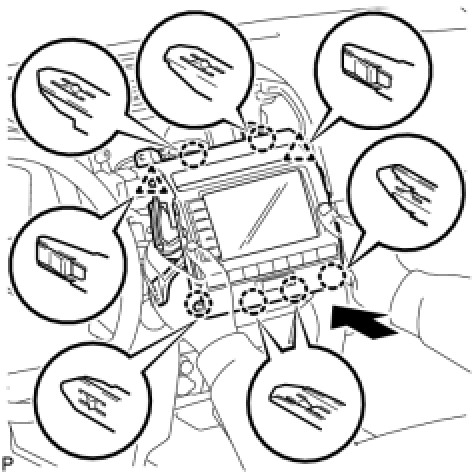
NOTICE:
When inserting the display, do not press the knobs on it.
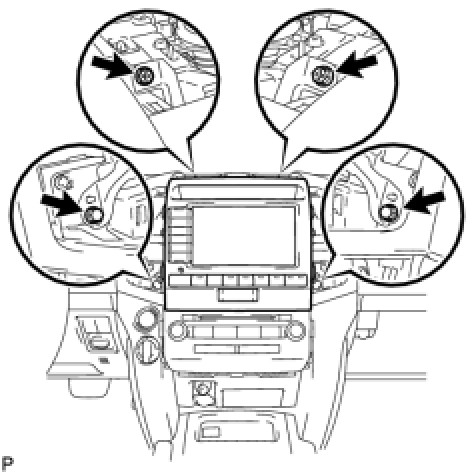
(c) Install the display with the 2 screws and 2 bolts.
Torque : 12 Nm (122 kgf-cm, 8 ft-lbf)
4. INSTALL NO. 4 INSTRUMENT PANEL REGISTER ASSEMBLY Installation
5. INSTALL NO. 3 INSTRUMENT PANEL REGISTER ASSEMBLY Installation
6. INSTALL NO. 1 SPEAKER OPENING COVER ASSEMBLY Installation
7. CONNECT CABLE TO NEGATIVE BATTERY TERMINAL