Transmission Position Sensor/Switch: Testing and Inspection
Driving Range Signal, Checking
Vehicles with automatic gearbox only
Engine Control Module (ECM) receives the following information from gearbox control module:
- Driving range selected (selector lever in 1/2/3/R/D) or
- No driving range selected (selector lever in P or N)
Special tools, test equipment and auxiliary items
- Scan tool V.A.G 1551 or vehicle system tester V.A.G 1552 with cable V.A.G 1551/3B
- Test box V.A.G 1598/31
- Hand multimeter V.A.G 1526 or multimeter VAG 1715
- Adapter set V.A.G 1594
- Wiring diagram
Test conditions
- The selector lever of the automatic gearbox must be in "P" or "N" position
- Air conditioner must be switched off
Test sequence
- Connect the scan tool V.A.G 1551 (V.A.G 1552). Then switch ignition on and select engine control module with the "Address word" 01. Connecting scan tool and selecting Engine Control Module (ECM). Refer to "Scan Tool Testing/Scan Tool Connecting and Initial Checks/VAG 1551 Scan Tool", Testing and Inspection
Indicated on display
Rapid data transfer HELP
Select function XX
- Press keys 0 and 8 for the function "Read measuring value block" and confirm entry with Q key.
Indicated on display
Read measuring value block
Input display group number XXX
- Press keys 0, 5 and 1 for "Display group number 51" and confirm entry with Q key.
Indicated on display (1-4 = Display zones)
Read measuring value block 51 ->
1 2 3 4
- Check specifications in display zone 3:
Display Group 51:
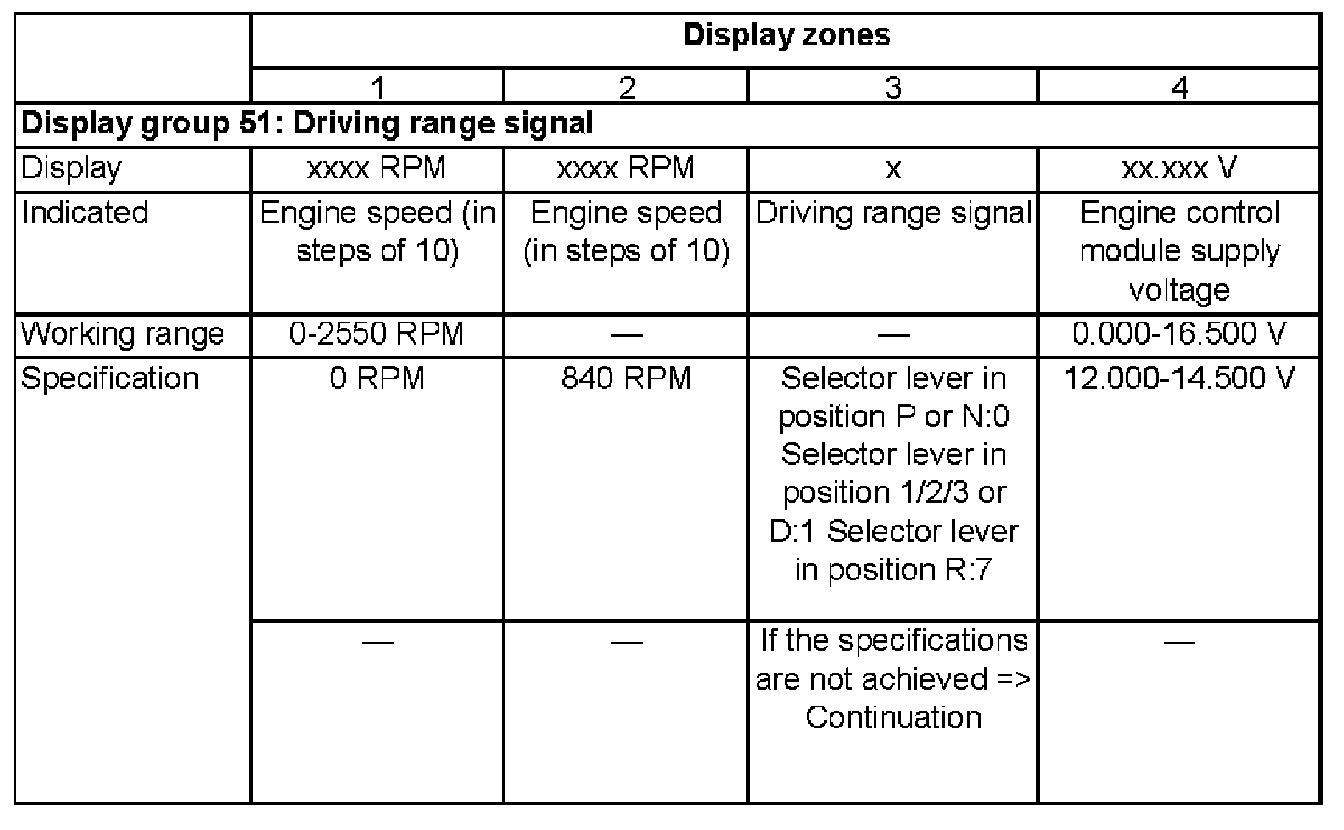
If the specifications are not obtained:
- Press the -> key.
- Press keys 0 and 6 for the "End output" function and confirm input with the 0 key.
- Switch off ignition.
Continuation
If the specifications are not obtained:
- Press the -> key.
- Press keys 0 and 6 for the "End output" function and confirm input with the Q key.
- Switch off ignition.
- Check the CAN-bus. Testing and Inspection