Reading
Measured Value (data) Block, Reading
- Connecting scan tool, initiating On Board Diagnosis (OBD).
Scan Tool, Connecting
On Board Diagnosis (OBD) For the Central Locking System, Initiating
The measured value block is divided into 10 display group numbers. The assignment of the individual display zones can be taken from the display group overview.
Indicated on display:
Rapid data transfer HELP
Select function XX
- Press buttons -0- and -8- (08 initiates function "Read measured value block").
Indicated on display:
Rapid data transfer Q
08 Read measured value block
- Confirm entry with -Q- button.
Indicated on display:
Read measured value block HELP
Input display group number XXX
NOTE: The display group number 001 is an example, to illustrate the sequence.
- Press buttons -0-, -0- and -1- for "Display group number 1" and confirm entry with -Q-button.
Read measured value block 1 ->
1 2 3 4
Indicated on display: (1...4 = display zones)
NOTE: To change to another display group proceed as follows:
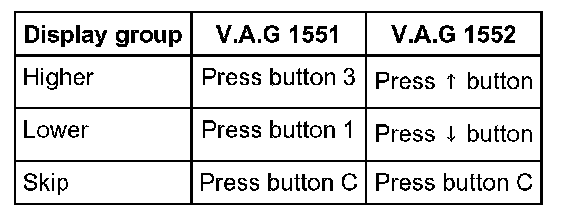
- Displayed after pressing -C- button.
Indicated on display:
Read measured value block HELP
Input display group number XXX
- Now enter the display group number required.