Charging A/C System (Engine Off)
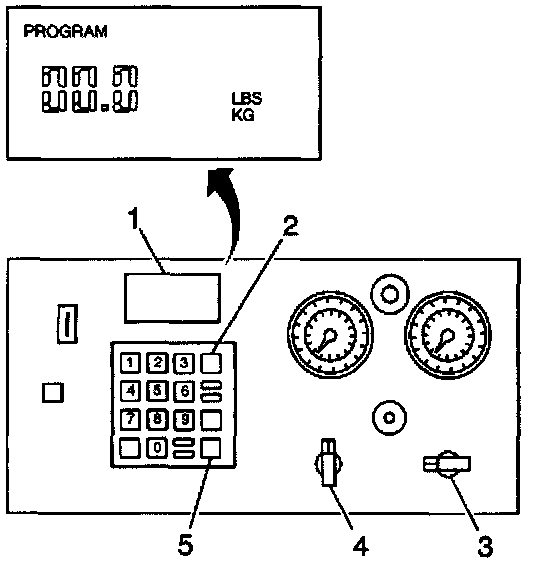


A/C Charging Using ACR4
IMPORTANT: Evacuate the A/C system prior to charging. Operate the LB/KG switch with the main power OFF.
1. Make sure that the LB/KG switch on the back of the unit is set for the desired weight.
2. Close the low side valve (4) on the control panel.
3. Open the high side valve (3) on the control panel.
4. Press CHG (2) on the keypad in order to set the program mode.
IMPORTANT: Do not overcharge the A/C system. Charge the A/C system with the amount of R-134a specified.
5. Enter the amount of refrigerant charge on the keypad in the correct unit of weight.
6. Charge A/C system with 0.74 kg (1.63 lb.).
7. Press ENTER (5). A blink indicates that the charge amount is in the unit's memory.
8. Press CHG (2) to begin the charging process.
9. The display (1) reads AUTOMATIC and the amount of refrigerant programmed for charging.
- The display counts down to zero (0) as the charging process proceeds.
- If the transfer of refrigerant stops before complete, refer to Unsuccessful Transfer in the J 39500 ACR4 manual.
10. It the display reads CPL (1), the transfer is complete. Follow the steps as outlined in Successful Transfer in the J 39500 ACR4 manual.