Initial Inspection and Diagnostic Overview
1. Verify the customer concern by operating the wiper and washer.2. Visually inspect for obvious signs of mechanical and electrical damage.
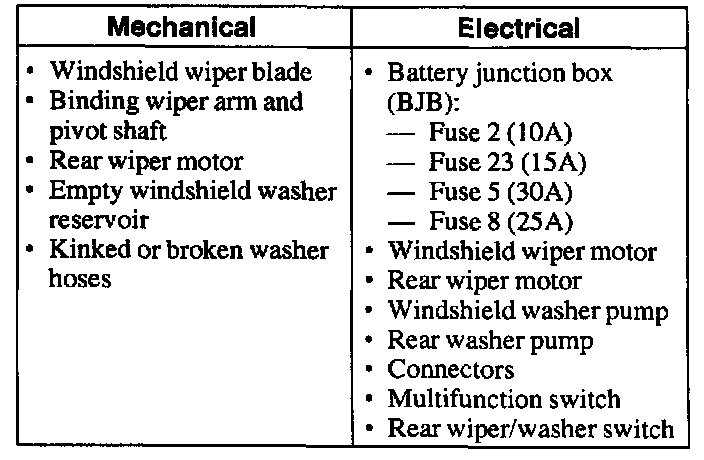
VISUAL INSPECTION CHART
3. If the scan tool does not power up, refer to the scan tool manual.
4. Carry out the DATA LINK DIAGNOSTIC TEST. If the scan tool responds with:
^ CKT914, CKT915 or CKT70 = ALL ECUS NO RESP/NOT EQUIP, refer to Module Communications Network (Information Bus).
^ NO RESP/NOT EQUIP for FEM, go to Pinpoint Test A. Test A: No Communication With The Front Electronic Module (FEM)
^ System passed, retrieve and record the Continuous Diagnostic Trouble Codes (DTCs), erase the continuous DTCs and carry out self-test diagnostics for the FEM.
5. If the DTCs retrieved are related to the concern, go to FEM Diagnostic Trouble Code (DTC) Index to continue diagnostics. Diagnostic Trouble Code Tests and Associated Procedures
6. If no DTCs related to the concern are retrieved, proceed to Symptom Chart to continue diagnostics. Testing and Inspection