Engine Controls/Emissions - MIL ON/DTC P1444 (EVAP)
Classification:EC03-023
Reference:
ITB03-063
Date:
October 30, 2003
2003 Q45 AND M45; MIL "ON" WITH DTC P1444 (EVAP CANISTER PURGE VOLUME CONTROL SOLENOID VALVE)
APPLIED VEHICLES:
All 2003 Q45 (F50)
All 2003 M45 (Y34)
IF YOU CONFIRM:
An Applied Vehicle has the MIL ON with DTC P1444 stored in the ECM:
ACTIONS:
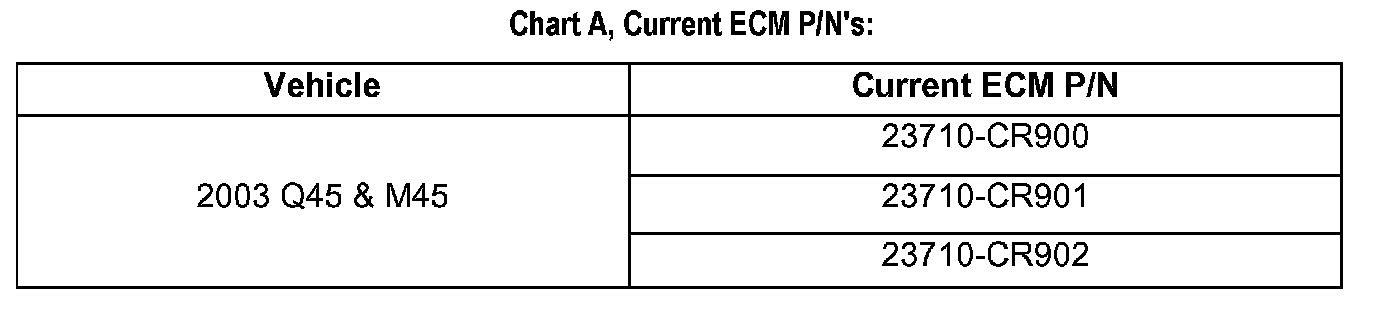
1. Confirm this bulletin applies:
^ Check the Current ECM Part Number (step 1 in the Service Procedure.)
^ Compare your Current ECM Part Number to Chart A.
If your Current ECM part number does not match one in Chart A, this bulletin does not apply.
Refer to the appropriate Service Manual (ESM) for further diagnostic and repair information.
2. Reprogram the ECM (needed if a match is found during ECM Part Number Check).
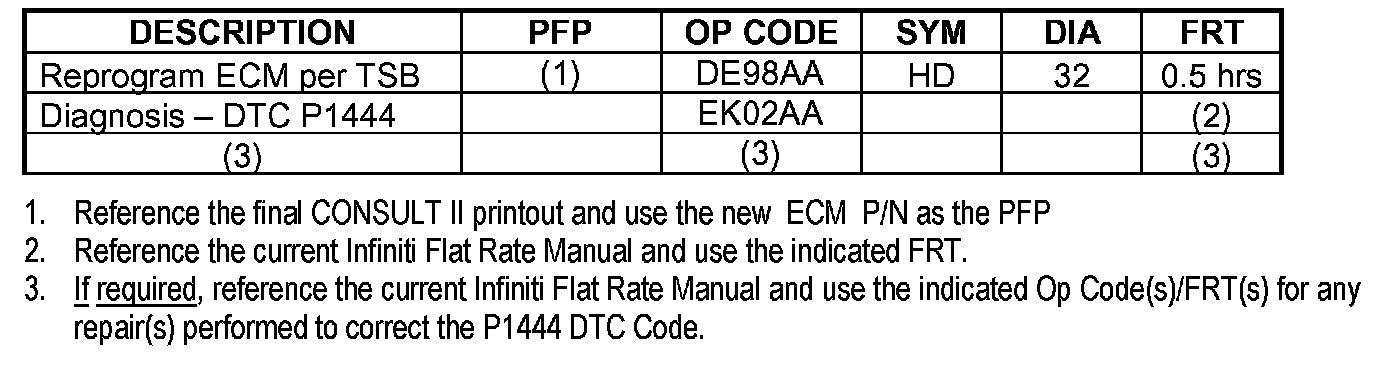
CLAIMS INFORMATION
Note:
If your Current ECM part number does not match one as listed in Chart A, this bulletin does not apply. Refer to the appropriate ESM and Flat Rate Manual for further diagnostic/repair information and claims coding.
Submit a Primary Failed Part (PP) line claim using the claims coding shown.
IMPORTANT:
The purpose of "ACTIONS" (above) is to give you a quick idea of the work you will be performing. You MUST closely follow the entire Service Procedure as it contains information that is essential to successfully completing this repair.
SERVICE PROCEDURE
Confirm This Bulletin Applies

1. With CONSULT-II "ON" print the Freeze Frame data as shown.
2. Attach this printout to the Repair Order.
^ The Freeze Frame data that you've printed contains the ECM Part Number (P/N).
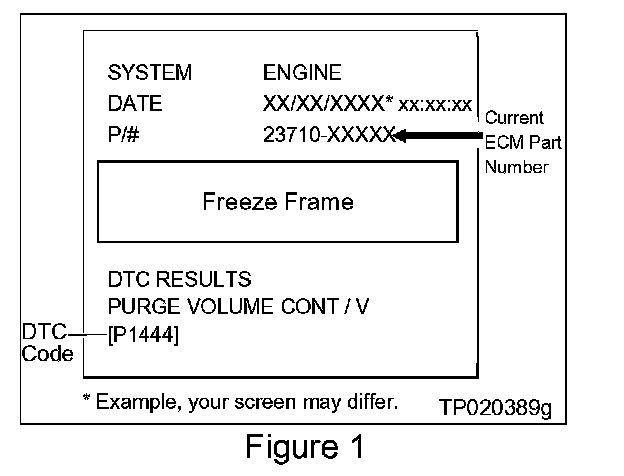
^ Figure 1 is an example of the F.F. Data printout.
ECM Part Number Check
1. Using the ECM Part Number printout from Step 1 (Figure 1);
^ Compare the vehicle's current ECM P/N to those shown under Current ECM P/N in Chart A.
^ This comparison will allow you to determine if the ECM needs to be reprogrammed.
A. If your vehicle's ECM P/N matches a P/N in the chart:
^ Perform ECM Reprogramming (below).
B. If your vehicle's ECM P/N does not match a P/N in the chart:
^ ECM Reprogramming is not necessary this bulletin does not apply. Refer to the appropriate Service Manual (ESM) for further diagnostic and repair information.
ECM REPROGRAMMING
Vehicle ECM Reprogramming Overview
^ There are four basic steps
1. Download reprogramming data (transfer it) from ASIST into CONSULT-II.
2. Preparation steps before reprogramming.
3. Reprogram the vehicle ECM.
4. Wrap-up after reprogramming is finished.
^ For those familiar with ECM Reprogramming please review the following steps and use them as a Quick Reference for ECM reprogramming.
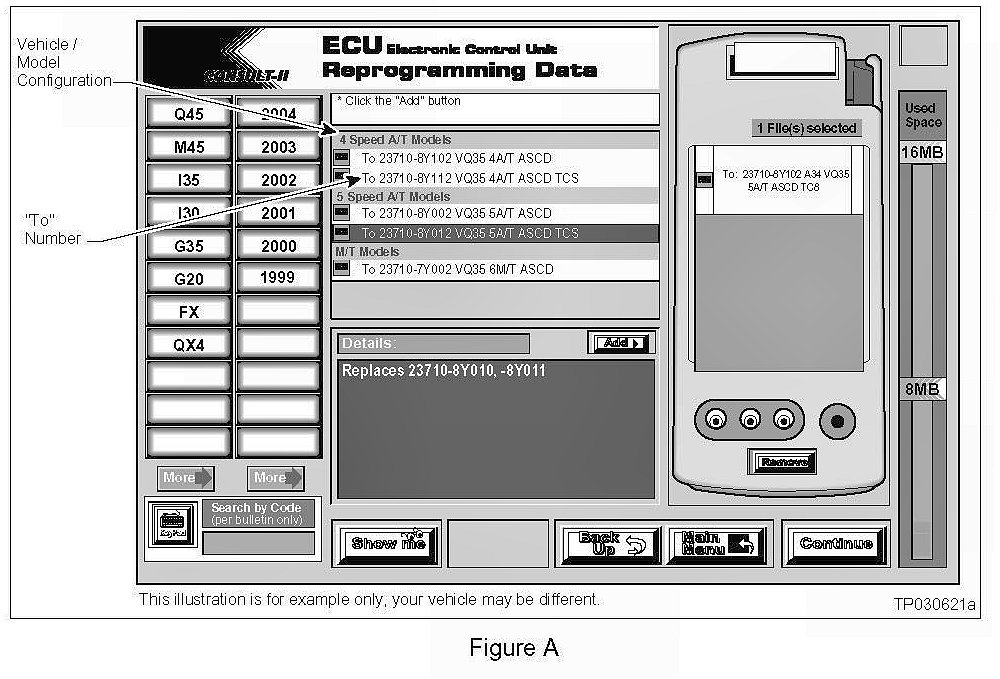
Step One: Download (Transfer) Data From ASIST Into CONSULT-II
1. Select vehicle model and model year (Example: I35, 2003).
2. Select the correct reprogramming data:
a. Locate the specific Model Configuration (Example: VQ35 4A/T ASCD TCS).
NOTE:
Model Configuration may include items such as engine type transmission type and vehicle options such as ASCD TCS ABS etc.
b. Select (click on) the "To" number. (Write the "To" number on the repair order.)
NOTE:
The "To" number will read: 23710-XXXXX.
3. Click on the Add button.
^ This will add the selected data to the File(s) Selected list.
4. Click on "Continue" and follow directions to perform "data transfer" (download) from ASIST into CONSULT-II.
Step Two: Preparation for Reprogramming ECM
1. Connect a battery charger on trickle (low) charge setting to the vehicle's battery.
CAUTION:
DO NOT connect the CONSULT-II AC power supply for items 2 and 3.
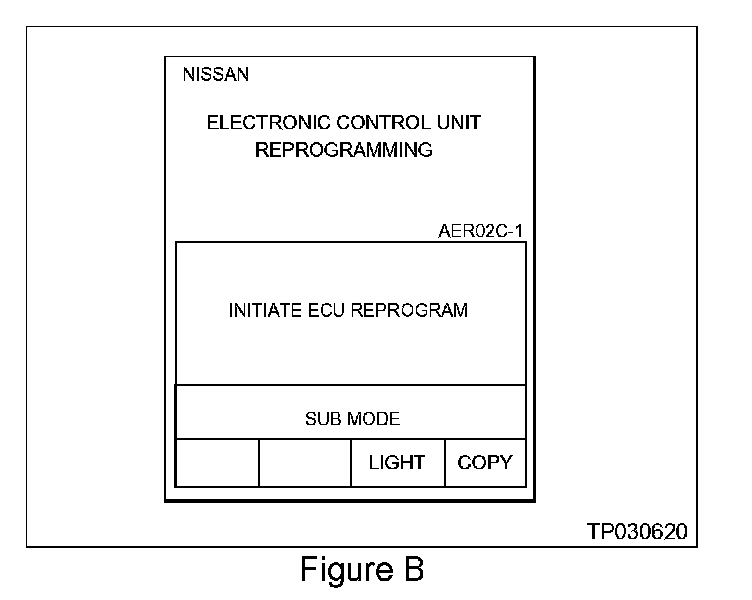
2. Press [SUB MODE] (see Figure B) then:
a. From the listed items find and select [BATTERY CHARGE].
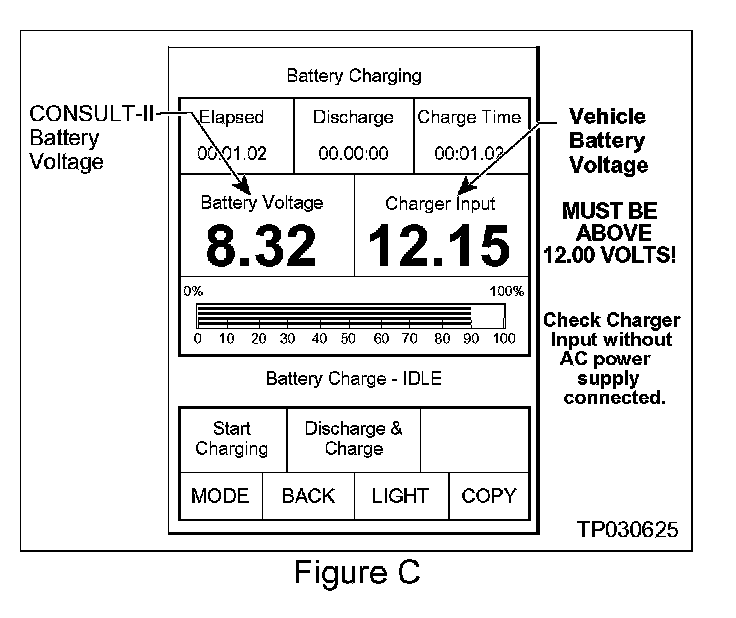
3. Check the CONSULT-II's Charger Input reading (see Figure C).
NOTE:
^ "Battery Voltage" is the voltage level of CONSULT-II's battery.
^ "Charger Input" is the voltage level of the vehicle's battery. (It must be above 12 volts.)
CAUTION:
If the "Charger Input" is below 12 volts:
^ The general procedure includes a list of items to check for when "Charger Input" voltage is below 12V.
Step Three: Reprogram the Vehicle ECM
Step Four: "Wrap-up" After Reprogramming is Finished
1. Turn the ignition switch "OFF" and CONSULT-II "OFF".
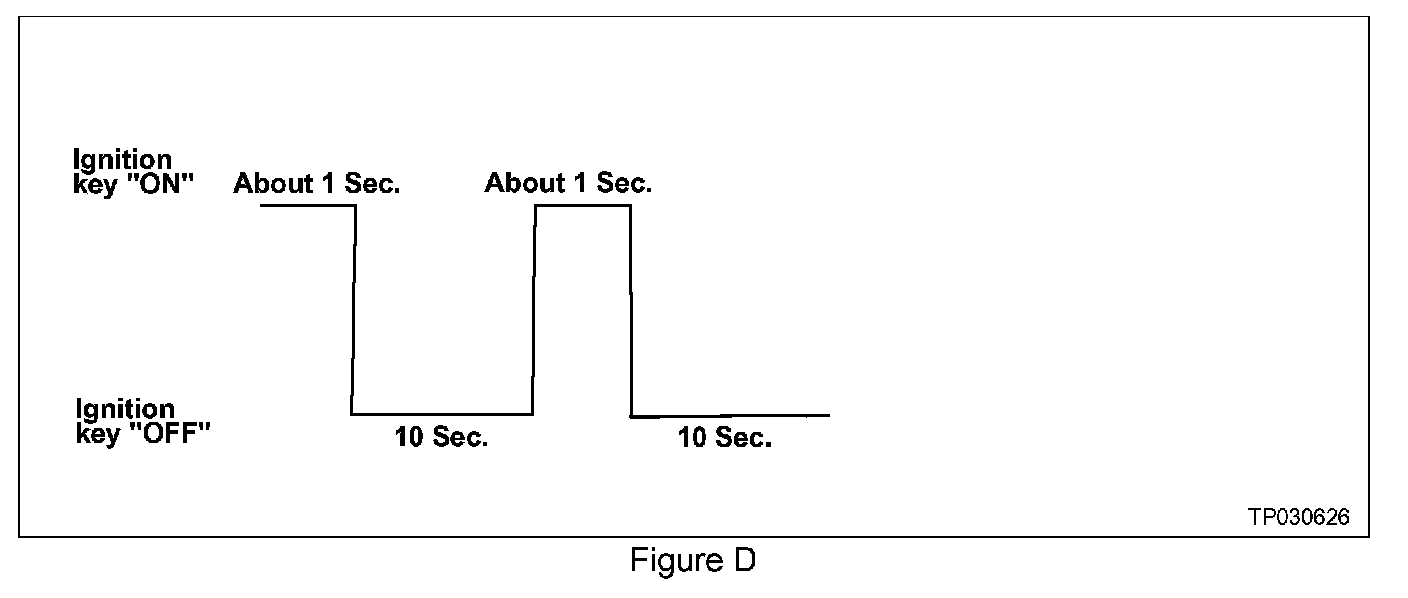
2. Wait more than 10 seconds then;
a. Turn the ignition switch "ON" for 1 second then
b. Turn the ignition switch "OFF" again for 10 seconds (see Figure D). This will reset ECM "self learned" Data.
3. Start the engine and check the idle speed.
^ If idle speed is too low perform IAVL (Idle Air Volume Learning). See the appropriate Service Manual (ESM) for this procedure.
NOTE:
If the engine will not idle hold the engine RPM at about 2000 then slowly bring it down to an idle. IAVL can now be performed.
4. Confirm the engine is operating normally.
5. Make sure the Check Engine Light (MIL) is not "ON".
^ If necessary use CONSULT-II and the Diagnostic (red/white) Card to erase any DTC's that may have stored during the reprogramming procedure.