Scan Tool Testing and Procedures
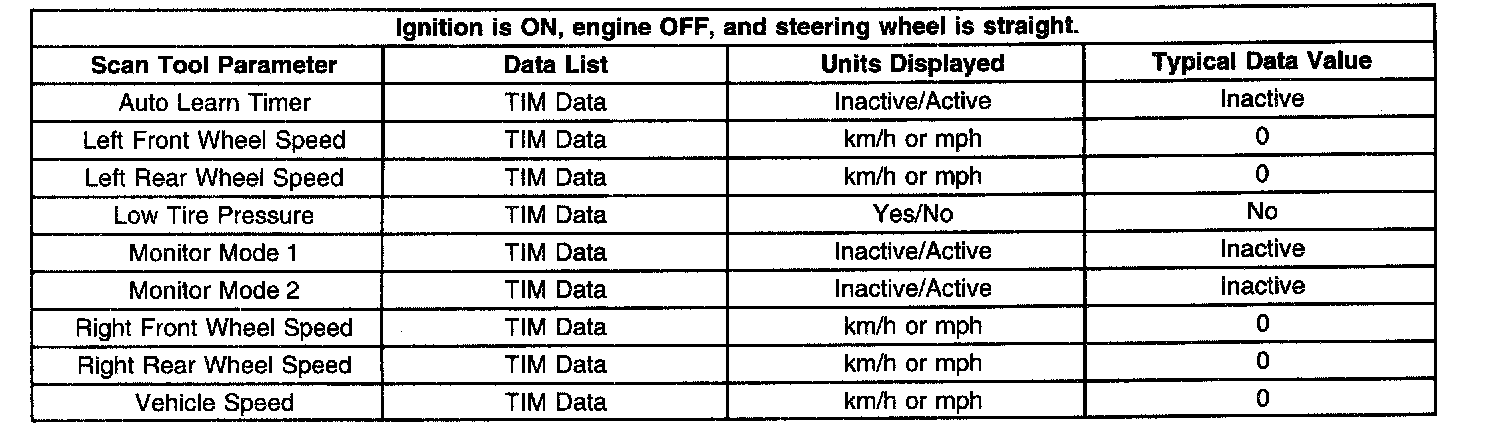
Auto Learn Timer: Scan tool displays: Yes/No -Display indicates if TIM is currently in learn mode.
Left Front Wheel Speed: Scan tool displays: km/h or mph - Display indicates the actual speed of the left front wheel.
Left Rear Wheel Speed: Scan tool displays: km/h or mph - Display indicates the actual speed of the left rear wheel.
Low Tire Pressure: Scan tool displays: Yes/No -Display indicates if the TIM status; whether or not the tires should be checked for proper air pressure.
Monitor Mode 1: Scan tool displays: Yes/No -Display indicates if TIM is currently in mode 1 monitoring. The EBCM has limited detection capability for a low tire condition and has only partially learned the tire inflation configuration for the speed range.
Monitor Mode 2: Scan tool displays: Yes/No -Display indicates if TIM is currently in mode 2 monitoring. The EBCM has full detection capability for a low tire condition and has fully learned the tire inflation configuration for the speed range.
Right Front Wheel Speed: Scan tool displays: km/h or mph - Display indicates the actual speed of the right front wheel.
Right Rear Wheel Speed: Scan tool displays: km/h or mph - Display indicates the actual speed of the right rear wheel.
Vehicle Speed: Scan tool displays: km/h or mph -Display indicates the actual speed of the vehicle.