Driver or Passenger Seat Lumbar Support Replacement
Driver or Passenger Seat Lumbar Support Replacement
Removal Procedure
1. Remove the front seat. Refer to Bucket Seat Replacement (Bucket Seat Replacement).
2. Remove the front seat back cover. Refer to Driver or Passenger Seat Back Cushion Cover Replacement (Driver or Passenger Seat Back Cushion Cover Replacement).
3. Remove the front seat back pad. Refer to Front Seat Back Cushion Pad Replacement (Front Seat Back Cushion Pad Replacement).
Important: The lumbar support must be in the relaxed position to remove the control cable.

4. Remove the lumbar control cable from the lumbar control.
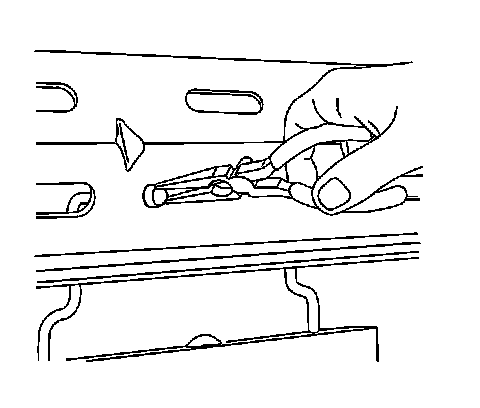
5. Remove the lumbar support from the front seat back by compressing the lumbar support push-in retainers.
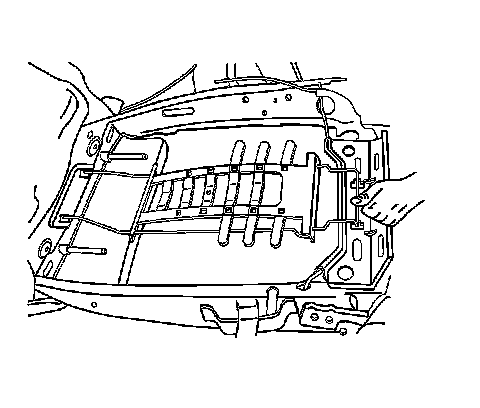
6. Remove the lumbar support from the front seat back.
Installation Procedure
1. Install the lumbar support to the mounting holes in the front seat back.
2. Install the lumbar support to the front seat back, pressing into place until fully seated.
3. Install the lumbar support cable to the lumbar support control.
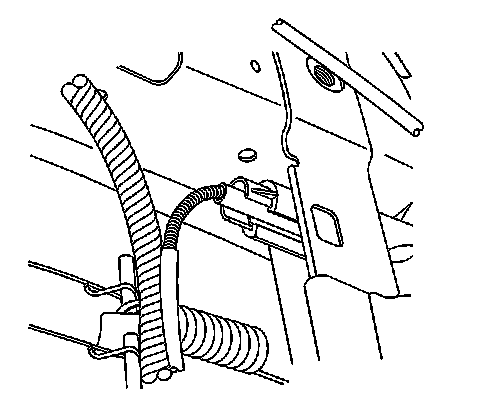
4. Install the lumbar support cable to the lumbar support control.
5. Install the front seat back pad. Refer to Front Seat Back Cushion Pad Replacement (Front Seat Back Cushion Pad Replacement).
6. Install the front seat back cover. Refer to Driver or Passenger Seat Back Cushion Cover Replacement (Driver or Passenger Seat Back Cushion Cover Replacement).
7. Install the front seat. Refer to Bucket Seat Replacement (Bucket Seat Replacement).