Diagnostic System Check - Rear Axle Controls
Diagnostic System Check - Rear Axle ControlsCircuit Description
The Diagnostic System Check is an organized approach to identify a condition created by the rear axle controls. The Diagnostic System Check is the starting point for a rear axle controls complaint. This directs you to the next logical step for diagnosing a rear axle control concern. Perform this check only if there is a driveability complaint or if you have been directed here from another service information section.
Follow the table to help reduce diagnostic time and help prevent unnecessary replacement of parts.
Diagnostic Aids
Important:
^ Do not clear the DTC unless directed by a diagnostic procedure. Clearing the DTCs will erase all Freeze Frame and Failure Records stored in PCM memory.
^ Poor engine performance can sometimes be diagnosed as a rear axle driveability condition. In order to avoid misdiagnosis of the rear axle, always perform Diagnostic System Check - Computers and Control Systems.
^ Use a scan tool that is known to function correctly.
If necessary, test the scan tool on another vehicle.
^ Ensure the scan tool contains the most current file available.
^ The scan tool will display a loss of communication error message under these conditions:
- The PCM power is interrupted.
- The ignition switch is turned OFF.
- The battery voltage level is very low.
- A poor connection at the diagnostic link connector (DLC).
Test Description
These numbers refer to the step numbers on the diagnostic table.
1. This step determines if the scan tool is receiving power through the DLC connector.
2. This step determines if the PCM is transmitting class 2 serial data to the DLC and that the Class 2 data circuit is not open or shorted.
3. The presence of DTCs indicates that the powertrain control module has detected a fault. Go to symptoms for other concerns.
4. This step determines if a DTC is current or stored in history.
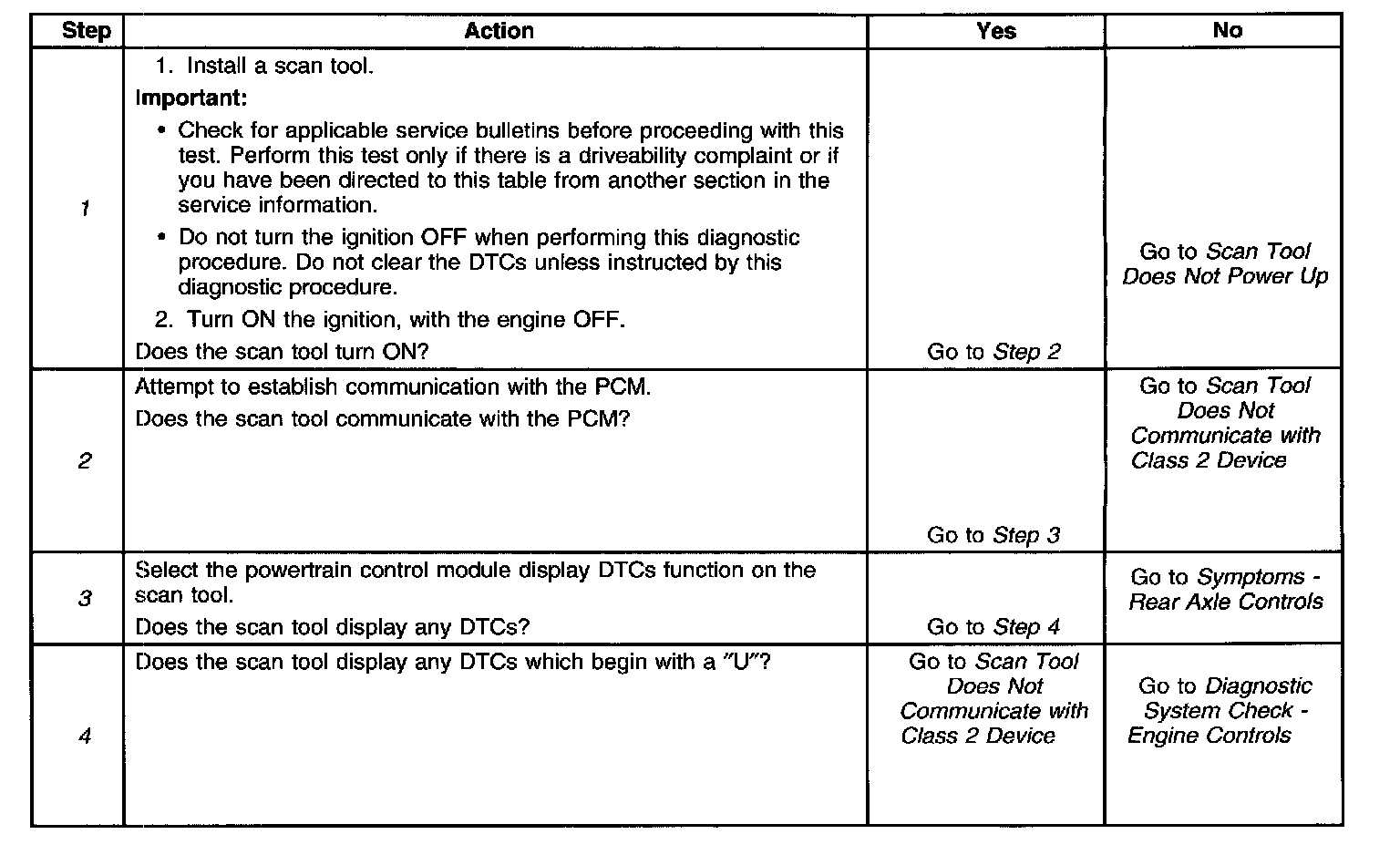
Diagnostic System Check - Rear Axle Controls
Scan Tool Data List
Use the scan tool data list under these conditions:
^ The Diagnostic System Check is complete.
^ The on-board diagnostics are functioning properly.
^ No DTCs are present.
These values represent a typical display recorded from a properly functioning system.
Important: Do not use a scan tool that displays faulty data. Report the condition to the scan tool manufacturer. The use of a faulty scan tool can result in misdiagnosis and the unnecessary replacement of parts.
Only these listed parameters are used for diagnosing. If a scan tool displays other parameters, the values are not recommended by General Motors for use in diagnosis.
Scan tool values were recorded under these conditions:
^ Engine at Idle
^ Upper radiator hose hot
^ Closed throttle
^ Transmission in PARK
^ Closed Loop operation
^ Accessories OFF
^ Brake pedal not applied