Scan Tool, Connecting
Scan tool, connecting
All functions which could previously be performed with V.A.G 1551/1552 can also be performed with the new tester VAS 5051 in the operating mode vehicle OBD.
Refer to Operating instructions for Vehicle Diagnosis, Testing and Information System VAS 5051.
Connecting VAS 5051
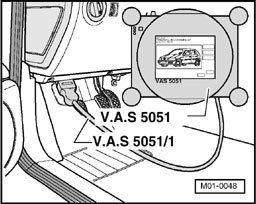
- With ignition switched off, connect tester VAS 5051 to Data Link Connector using diagnosis cable VAS 5051 /1 or VAS 5051/3.
Selecting operating mode:
- Press button on display for "Vehicle OBD".
Selecting vehicle system:
- Press "03 - Brake electronics" on display.
The control module identification and coding are indicated on the display.
Selecting diagnosis function:
All diagnostic functions available are indicated on the display.
- Press button on display for desired function.
- Further measures refer to repair procedures.
Note: The following test sequences are for V.A.G 1551 scan tool.